Get ready for another thrilling update to your favorite Joomla page builder!
SP Page Builder v6.3.0 is here with a bunch of long-awaited features and fresh improvements you’ve been eager to explore.
So, without further delay, let’s jump right in and uncover what this update has in store!
SP Page Builder Changelog v6.3.0:
- New: Added Geolocation field in Dynamic Content.
- New: You can now add your legacy article detail layout into Dynamic Content.
- New: Added responsive support for Section background image and its related options.
- New: Added a layout override system to customize SP Page Builder layout files directly from the active template.
- New: Dynamic Text addon now contains text truncation option.
- New: Added option to trigger popups directly from the Feature Box addon button.
- Update: Alt tag support in Image field of dynamic content.
- Update: Enhanced the visual appearance of the font family selector in the Typography preset field.
- Update: Improved dynamic article loading performance issue.
- Fix: Resolved margin issues caused by custom button styles in Form Builder.
- Fix: Added missing width units and max-width option in the Advance Tab addon.
- Fix: Fixed responsiveness issues in the Slideshow addon.
- Fix: Resolved interaction flickering issues in Safari.
Fetch Your Legacy Article Details Layouts into Dynamic Content
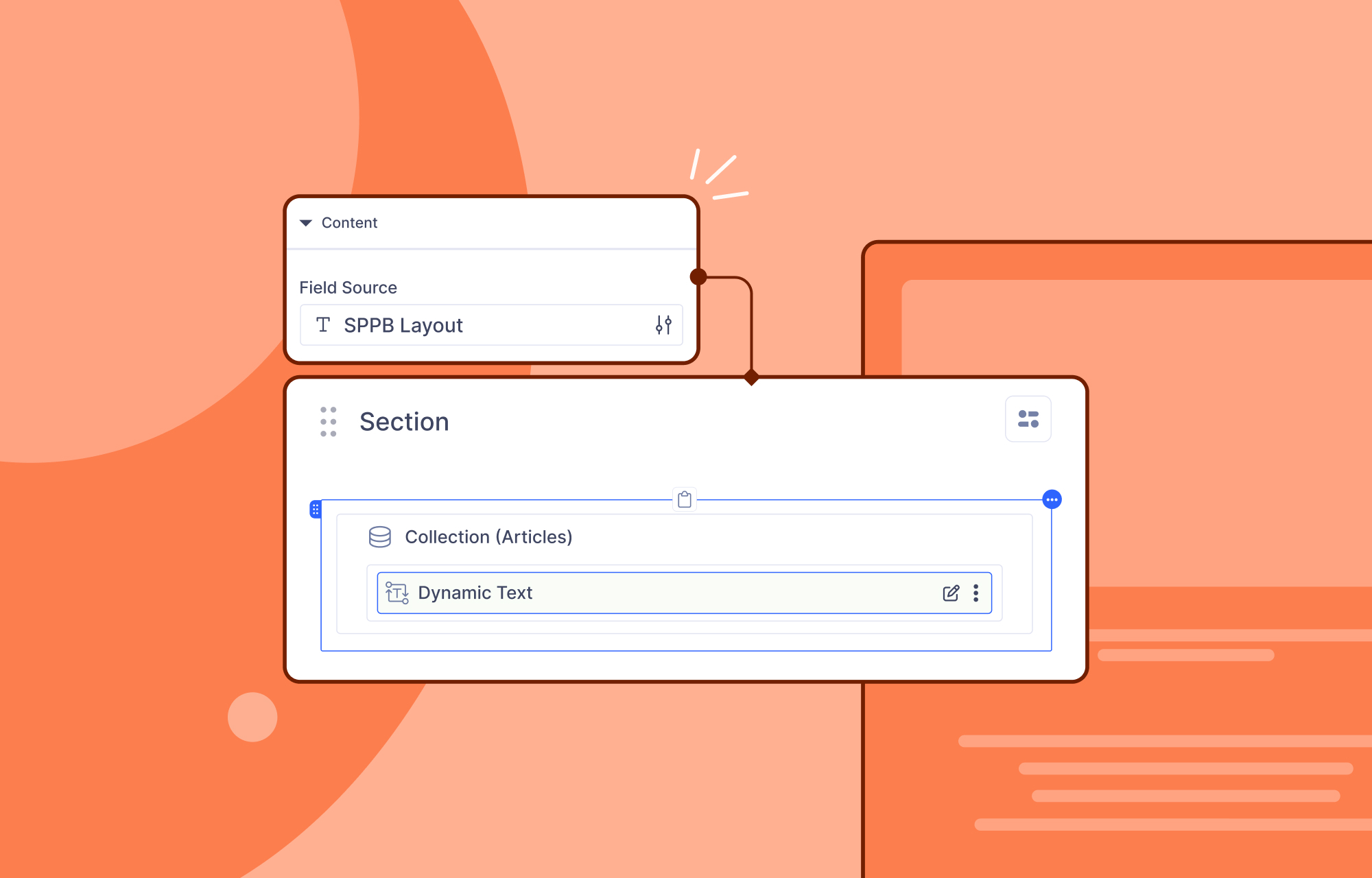
You can now bring your existing SP Page Builder Article Details layout directly into Dynamic Content, creating a smoother and more unified design workflow.
Previously, even if you had already designed an Article Details page with SP Page Builder, there wasn't any direct way to reuse that layout inside a Dynamic Content details page. You would have to rebuild everything again from the beginning.
With this new option, that limitation is gone. If you already have an Article Details design in place, you can now seamlessly fetch the same layout into your Dynamic Content Article Details page, saving time and letting you transition into Dynamic Content without starting over!
How does it work:
Just add a Collection addon, assign it to Articles, drop a Dynamic Text addon inside, and link it to your SP Page Builder Layout. And that is all you need to do!
Show Exact Locations with Geolocation Fields
Just when we thought this update couldn’t get any better, here’s a feature to make you even more excited—Geolocation fields are finally here!
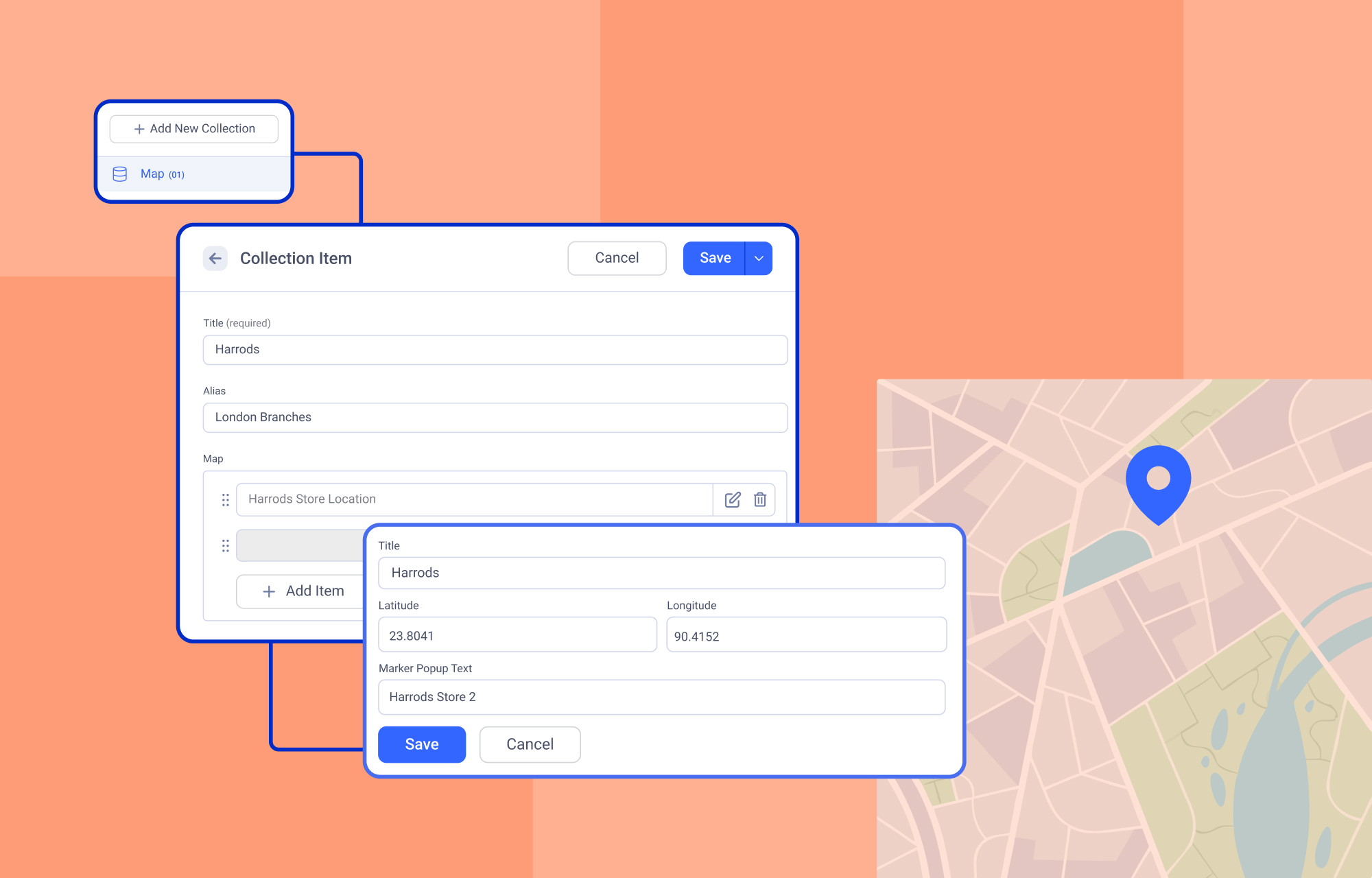
The Geolocation field in Dynamic Content lets you capture, store, and display location-based information for your articles, listings, or any type of content. It adds context, personalization, and a real-world touch that makes your content truly come alive.
Adding your location is super easy—just enter it, and the longitude and latitude fields are populated instantly!
How does it work:
Using the geolocation field to your pages is easy! Simply add Geolocation fields to your collection items and then display them in the frontend by using the Dynamic Media addon and linking it to the corresponding geolocation field.
Why you’ll love it:
Enter Your Address Directly: You can simply type in the address of your content or item, and it will be recognized by the Geolocation field.
Single or Multiple Locations Per Item: Each collection item can hold one or multiple addresses, giving you the flexibility to display multiple properties with several locations.
Automatic Longitude & Latitude Detection: Once you enter an address, the longitude and latitude are automatically generated. This ensures accurate mapping and makes it effortless to display locations on maps without manually calculating coordinates.
Interactive OpenStreetMap Display: The Geolocation field fully supports OpenStreetMap, letting you display your locations on a clean, interactive map layout.
Other Notable Features
Dynamic Text Added Truncation Option
You can now control how much text is displayed in your dynamic content with the new truncation option. This makes it easier to keep layouts clean and readable, especially when working with long articles or descriptions.
Responsive Support for Section Background Image and Its Related Options
Section background images now adapt perfectly to any screen size, giving your pages a polished look on desktops, tablets, and mobile devices. All related settings, like Background Position, Background Repeat are now fully responsive as well.
Popup Trigger Option in Feature Box Addon
The Feature Box addon now lets you trigger popups directly, making it a powerful tool for announcements, promotions, or call-to-actions. Users can interact with your content in new ways, boosting engagement and conversion opportunities.
Alt Tag Support in Image Field of Dynamic Content
Images in Dynamic Content now have alt tags, improving both accessibility and SEO. Effortlessly describe your dynamic image features for screen readers and search engines.
Please go through the complete changelog to learn about all the changes included in this update.
Update Time!
Dont miss your chance to experience all these awesome new additions included in this latest version. And do let us know your experience in the comments below.
Good luck!
Comments (7)