Hi,
may I have the custom css code to use also font-family: Architects Daughter for the menu.
Thank you!
Best Jörg
Hi,
may I have the custom css code to use also font-family: Architects Daughter for the menu.
Thank you!
Best Jörg
Hi there!
Thanks for your query.
You can do this with the help of your Typography section of the Template Options either.
Here is a screenshot for your ease: https://prnt.sc/B5ELYZLj2Ft-
Hope this helps!
Best Regards
Hi Rashida,
thank you. This is for me not possible, because we cannot use google font directly from the google server.
(german dsgvo).
May I have a custum css code to use the type.
I take this code for the offcanvas menu.
.offcanvas-menu .offcanvas-inner ul.menu > li a,
.offcanvas-menu .offcanvas-inner ul.menu > li span { font-family: "Architects Daughter"; }
May I have the custom css code for mega menue?
Hi Joerg,
It's also very easy:
#sp-menu .sp-megamenu-parent > li > a,
#sp-menu .sp-megamenu-parent > li > span  {  font-family: "Architects Daughter";  }
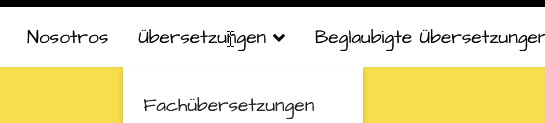
After using above CSS code it should look like that
Hello Paul ,
thank you. May I have also the custom code for the Dropdown Menu and last the custom css for the font size... .
Best Jörg
Hello,
Here is the code all together:
.sp-megamenu-parent>li>a, .sp-megamenu-parent>li>span, .sp-megamenu-parent .sp-dropdown li.sp-menu-item>a, .sp-megamenu-parent .sp-dropdown li.sp-menu-item span:not(.sp-menu-badge) {
    font-family: 'Architects Daughter';
    font-size: 19px;
}
Kindly, use this code in your custom CSS. You may adjust the font size value as per your need.
Note: Path towards custom CSS(Joomla 3): Extensions>Templates>Styles> Click on your current default template name then choose Template Options. Then find custom CSS within the custom code.
Best Regards
Hello Rashida,
thank you.
You are always welcome:)

