
How is Sticky Sidebars supposed to work in Helix Ultimate v2.1.0? I recently upgraded to Helix Ultimate v2.1.0 and I am using the template edulif. There is no difference when I enable the Sticky Sidebars option in the right column options.
Staff replied
Helix Framework
Sticky Sidebars Helix Ultimate v2.1.0
Asked by Alex
2 years ago
Last activity 2 years ago
10 replies

Paul Frankowski Senior Staff
2 years ago
· edited
Hi Alex,
To use Sticky Sidebars, you need raw Helix Ultimate V2.1.1 template (from 17 May 2024).
In older templates based on HU that feature does not exist or may not work. Anyway remember to update Helix plugin first, then recheck view.
Remember to enable that in Layouts > Right/Left settings.
Alex Asked this
That is dissapointing.
Alex Asked this
I just tried with with a raw Helix Ultimate V2.1.1 template and it also does not work. I checked the template and plugin versions and both state 2.1.1.
Paul Frankowski Senior Staff
2 years ago
· edited
Without link hard to say.
On my sites it works, In particular, on those in which I have an article. It's based on simple CSS after all, position:fixed.
I can create video if that may help you somehow.
Alex Asked this
Hi Paul,
I understand it is simple CSS, but that is not the point. It needs to work as intended. Attached a link. I appreciate your help!
Paul Frankowski Senior Staff
2 years ago
· edited
Check if you enabled that, only then can work.
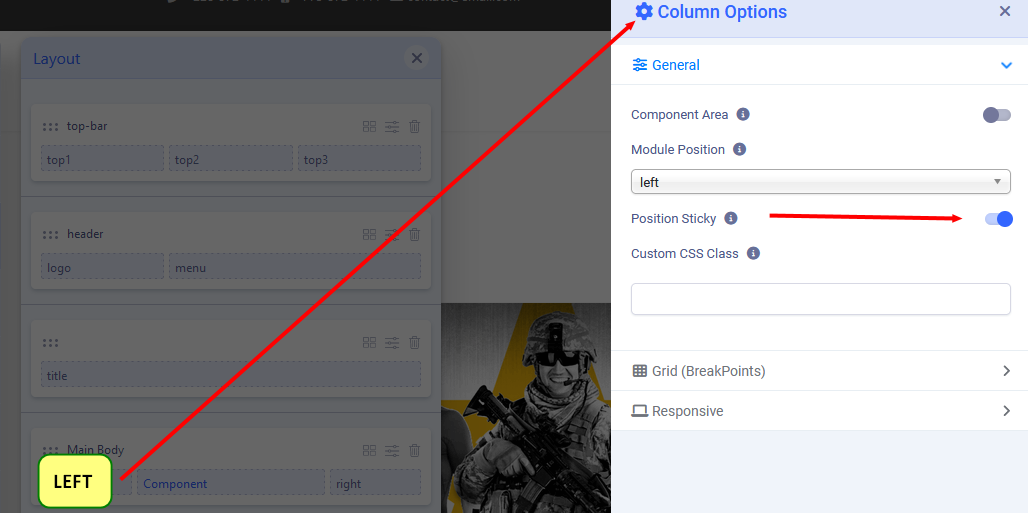
after you should have "inner-wrapper-sticky" class name

in theory you can also put that class name in "Custom CSS Class" field, but with extra space before name. But On/Off should work.
Alex Asked this
Yes of course, see attached video.
Paul Frankowski Senior Staff
2 years ago
· edited
In that case put manually class name (read my tip again).
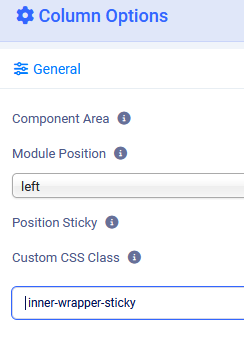
Remember to clear Joomla cache deeply, and keep enabled ON!
Alex Asked this
I understand how to manually add the class name or even create the CSS from scratch. However, that's not the issue. The feature should function correctly simply by enabling the option in the configuration.
Paul Frankowski Senior Staff
I tested on 3 sites, and worked everywhere.
Have you added class name?
Log in to reply.