Formatting texts and changing font size on cell phones and computers - Forum | JoomShaper
Solved Helix Framework

Formatting texts and changing font size on cell phones and computers

Asked by Fernando Bautista 1 year ago Last activity 1 year ago

Best regards and I hope you are well.

I use Helix Ultimate and Joomla 5.2.3

I want to know if it is possible to assign a different font size on both cell phones and desktop computers and also if it is possible to assign formatting (justified) when viewed only on computers.

My website is https://portalnews.co and I want the font to be larger when viewed on computers.

In case you need extra information, the articles are written with JCE Editor Pro.

I understand that the Helix Ultimate template has its own options as does JCE Editor, but I need to understand if these formatting and text size options are managed from the global template options or from JCE Editor.

If this is possible: Could you please tell me how to do it?

Thank you very much in advance for your kind collaboration.

Accepted answer

Marked as the solution
Paul Frankowski Senior Staff

Hi Fernando.

For sure, using font-size from JCE Editor will not help in that, even on the contrary it can only make it more difficult (!)

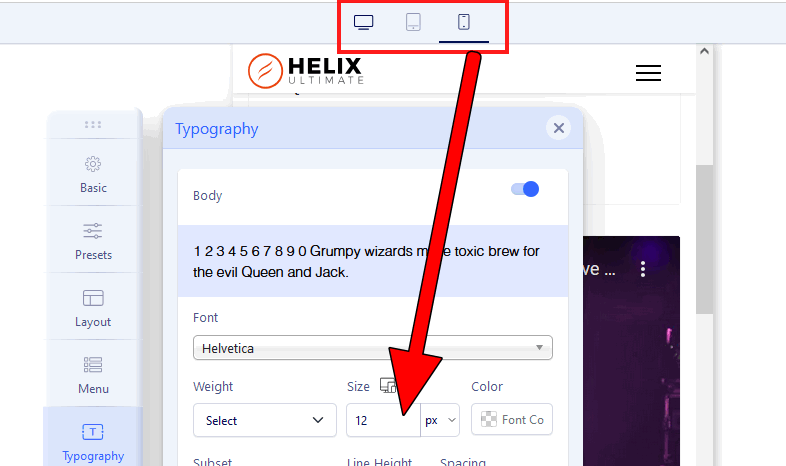
It can be done from Template Options > Typography

info_3124_2025.gif

3 more replies

Paul Frankowski Senior Staff
1 year ago · edited

Or you can change font-size or other formatting styles using Custom CSS.

If you as webmaster know the basics you should know how it works. Here is basic example for Mobile view:

@media screen and (max-width: 580px) {
.article-details  p, p { font-size: NEW-VALUE; }    
.article-details  ul li { font-size: NEW-VALUE; }    
.article-details  h2 { font-size: NEW-VALUE; }    
.article-details  h3 { font-size: NEW-VALUE; }    
.article-details  h4 { font-size: NEW-VALUE; }    
}
Fernando Bautista Asked this

Kind regards Paul and thank you very much for the answers.

After analyzing the easiest thing you suggested, I implemented option #1 (manage everything from template options) I see that it is the right thing to do and it actually worked perfectly, now the text of the articles on my website looks bigger, justified and better distributed on desktop computers from global options in Helix Ultimate.

We will continue using JCE Editor since we have been using it for 10 years and it works perfectly for our article writing work, I hope that you never think of removing the fact that we can continue using this important article editing component from Helix Ultimate, you two (Joomshaper and JCE Editor) are unbeatable in the world of Joomla and therefore on the web.

Thank you very much for your kind guidance.

Lorna Guttormson

I would also like to change the sizes for different size displays and would prefer to use your option #1 but I don't see how to set sizes and weights for any more than one size display . Fernando says it works beautifully so perhaps I am misunderstanding. We currently have font size 20px but for a cell it is too large. I can set them using the custom css but would prefer using the template options - typography if possible.

Lorna Guttormson

My error. I found it.

Log in to reply.