Colors problems in the dashboard easystore config - Forum | JoomShaper
Solved EasyStore

Colors problems in the dashboard easystore config

Asked by Deleted user 1 year ago Last activity 1 year ago

Hello,

Im new with easystore, and with the template Craft (im trying to modify the template, instead of doing everything from scratch...)

This morning i'm trying through the steps of configuration in the easysotre component settings 8bacjend in joomla)

But the backgroud is blck, and the text is blach too,
and when the background is white, the text is white.

I guess ive changed yesterday some colors in the Sp page builder. I dont even rememnber how to go there...
i guess i have a lot of work and learning to do yet.

any help please ?

and how to add screenshots here ?

Thanks

Jo

Accepted answer

Marked as the solution
Paul Frankowski Senior Staff
1 year ago · edited

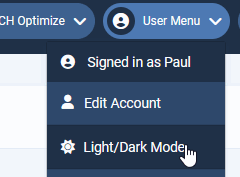
Disable Dark Mode (switch to Light) in Joomla Admin and check again.

info_3365_2025.gif

SPPB Admin don't fully support that color feature yet.

5 more replies

Toufiq Senior Staff

Hi there,

Thank you for reaching out, and I apologize for any inconvenience caused by this oversight. To better address the issue, could you kindly provide Joomla administrator access? This will enable me to thoroughly investigate the matter and provide you with a prompt resolution.

Note: Can you share a screenshot about your problemtic area?

Best regards,

Toufiqur Rahman (Team Lead, Support)

Deleted user Asked this

hello,
Thanks for your answer, yes i would like to share pictures, but i dont know how

Deleted user Asked this

That's it, great ! Thank you : )

Log in to reply.