Saved a Copy of a Dynamic Content Page - not showing to add menu - Forum | JoomShaper
Staff replied SP Page Builder

Saved a Copy of a Dynamic Content Page - not showing to add menu

Asked by PhoenixGB 1 year ago Last activity 4 months ago

Hi

I have a client with a very simple dynamic content collection, it's a dog charity. When the new fields like gallery and video were added I added these fields to the collection. Rather than having to edit the existing details page I saved a copy of the page.

I added the new fields to the newly copied page and removed ones that were no longer necessary.

My thinking was they can work on adding the new content to the dynamic collection and once complete I change the menu item to the newly saved copy of the details page. No downtime.

I wanted to test the layout but I can't see the newly saved page to add it to a menu unless I add it to a menu from the SPPB pages page itself using the Add to Menu. When I do this the page shows no data.

The slugs the same so I assume it is supposed to connect to the same dynamic collection page? All the fields on the page are showing the right collection and the right filtered field.

Thanks

15 replies

Ofi Khan Staff

Hello PhoenixGB,

Thank you for reaching out to our technical support forum. I’m sorry to hear about the trouble you’re experiencing. Rest assured, I will look into this issue for you and work to resolve it as quickly as possible.

I have checked your issue but cannot produce it on my end. Please share a screencast so that I can get your issue properly and help you.

Best regards

DSmith

I have a similar experince, I was attempting to create a variation of the dynamic index page that would refernce a slightly different copy of the details page.

However, any attempt to redirect to the duplicated details page, resulted in only the orginally details page being rendered. I could never get it to connect to the copy. I removed the original details page and recieved a 404 when trying to reach the copy on my next attempt, even though it was designated in the index page as the destination.

From what I can tell, you cannot duplicate either the index or details page. It appears to be a one time only option.
You cannot even recreate it until you have cleared the original page from the trash. It would be amazing if you could have varations of both the index and details collections.

PhoenixGB Asked this

Which does beg the question...

'have you (Ofi Khan) created a dynamic details page from scratch and then tried to save a copy and then assign the copy to a menu?'

I have just tried again on the clients practice site. If u want i can supply a url and SU credentials.

This is a something that definitely needs looking into as I can foresee a number of situtaions where this could happen again.

PhoenixGB Asked this

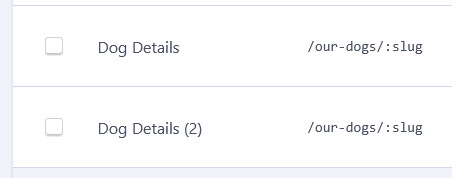
My gut tells me it's do to with the slug, see image (unlike WP where a slug can be edited we dont have that option) and we end up with two identical slug.

DSmith

I need to correct my comment, after more testing. I was able to duplicate both the dynamic index and details page, once renamed. I was able to redirect to the desired details page for each of the unique index pages. Not sure why it would not initially allow this to happen.

DSmith

Once again, wrong.. not working after reload.

Ofi Khan Staff

This issue has been reported to the developer team. It will be fixed soon.

PhoenixGB Asked this

Thanks, when could we expect a resolution?

Ofi Khan Staff

It will take some time. We have also discovered some other issues regarding Dynamic Content. I think we might need 3 weeks to work on these.

PhoenixGB Asked this

Good to know your on the case. What are the other issues we should be aware of?

Log in to reply.