Is there any way using Helix Ultimate to make the border between the component and the bottom have a wavy shape? That is, I would like to give it a curved shape so that it is not a straight line.
Solved
Helix Framework
Separation between the component and the bottom.
Accepted answer
Marked as the solution
Paul Frankowski Senior Staff
1 year ago
· edited
Hi David,
Using Template Options you cannot do that.
You can do that:
- Using SPPB Module on whole bottom area, with Row section settings.
- Or by custom CSS
we help only with (1)
You can use "Bottom" section that you already have and module in "bottom1" position OR indeed, create a new row with module position above bottom. But make sure that that new Row you will set "Fluid width" (Full Width) - screenshot below.
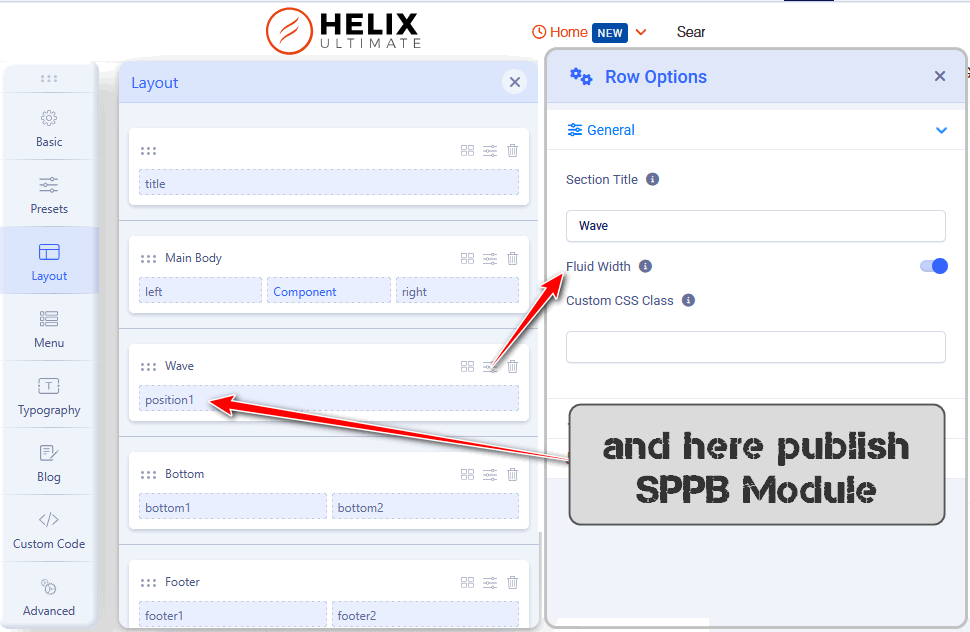
Looking at your example Viviendo site (WordPress), they used Footer position.
David Forés Asked this
Hi Paul,
Thank you for your reply. It is just as I thought it should be done.
1 more reply

Rashida Rahman Staff
Hi there!
Thanks for reaching out.
There is no default option to achieving this from Helix Ultimate, but you can do this easily with SP Page Builder if you have it. Please check the following screenshot:
https://share.cleanshot.com/xjs9nQjT
Moreover, you can create a module with SPPB type and take a section there, do the necessary changes with your content and publish the module as your bottom or footer. This way you can have the wavy shape in your desired position.
Best regards
David Forés Asked this
Hello,
In my case, I want this style to be applied to all pages, so the change should be made at the template level, not just for a single page.
If I understand correctly, the ideal would be to create a layout position in the Helix Ultimate template that is just above the “bottom” positions, and then create a module with SP Page Builder that is assigned to that position. In that module there would only be a section to create the desired wavy shape.
Is this approach correct?
Best regards.
Rashida Rahman Staff
Yes, that was correct. Glad that you got your desired output already:)
Log in to reply.