
Hi,
When I add a SVG as logo, the size set here does not work => https://imgur.com/a2CbK4g
Why?
Thanks
L.
Hi,
When I add a SVG as logo, the size set here does not work => https://imgur.com/a2CbK4g
Why?
Thanks
L.
I made test on my own demo site, I used dot.svg file and I was able to resize that logo using only Height settings (desktop and mobile) and SAVE button. Look
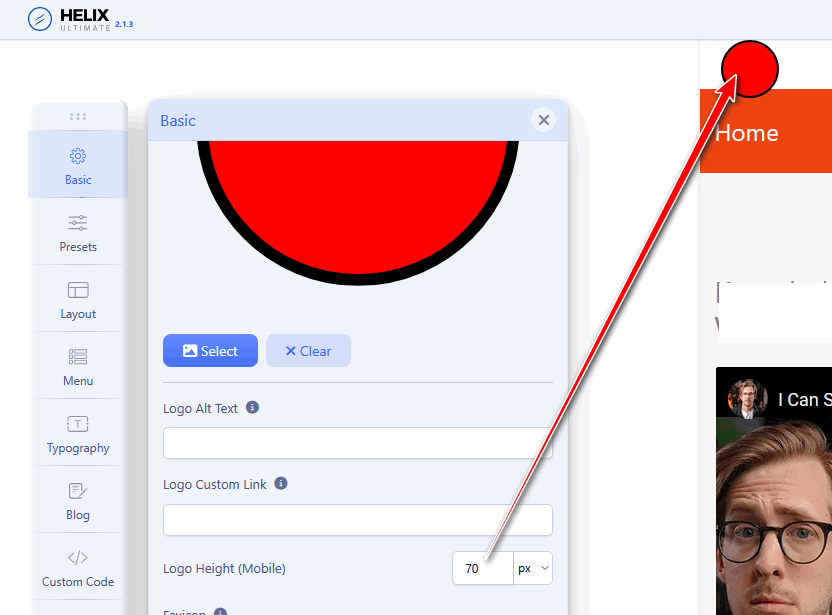
but as I know/read, To resize an SVG image using CSS, you can use also standard CSS properties like width and height.
You can play with my red ball as well. You have nothing too lose, maybe only 3min of fun.
ok thanks for your feedback
Hi
Thanks for contacting us and sorry for your issue. Could you please keep a full site backup and give me your super admin access? So that I can check.
-Regards.
could you please check first from your side.
it seems SVG size management does not work exactly as other images format (jpg/png)
Hi
I have checked this issue in my end and also face the same problem. Sorry for this inconvenience. I will reported this bug to our list and inform our DEV team about it. So that they can fix it ASAP.
ok thanks
You are most welcome.
Hi
Could you please check the latest version of Helix Ultimate? It seems ok in my end, I have checked it in the latest version of Helix.
I think you did no understand the issue.
On your screenshot, your are showing TEXT logo.
I'm talking about SVG logo....
share link to website where you have that Mobile logo (in .svg format) it will be easier to talk.
and indeed, be default those values works for typical image format (png, gif, jpg), svg is more complicated.
I have no specific website to provide.
The question is : when I use a SVG logo for my website logo, how does it work for the size regarding this field => https://imgur.com/MHwbbQS

