Recently, the first page of the blog has been looking strange. The columns have an inexplicable width on my tablet in landscape mode. From the second page onwards, everything looks fine again.
Solved
Helix Framework
Columns Blog page
Accepted answer
Marked as the solution
Paul Frankowski Senior Staff
9 months ago
· edited
Start from article "Joomla 6: Moderne Webentwicklung auf einem neuen Level" please open in HTML mode and remove all trash html code (added probably by ChatGPT), mostly first lines of <div class=...
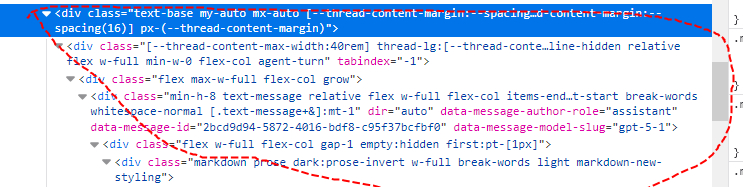
Delete all those, also </div> at the end, and keep only <p> ..... </p>
Next time when you will use copy-paste, check HTML code before using Save & Close.
Peter Klinke Asked this
Thank you very much and a happy new year, Paul!!
Peter
2 more replies

Atick Eashrak Shuvo Staff
Hello There,
Thank you for reaching out, and we apologize for the inconvenience. To help us investigate the issue more accurately, could you please share a screenshot showing the first page of the blog on your tablet in landscape mode? This will allow us to identify the layout problem and provide the appropriate solution.
We appreciate your cooperation and look forward to your update.
Paul Frankowski Senior Staff
9 months ago
· edited
Hi Peter,
it's common problem, when inside intro content of one of articles you used <div> but there is no closing </div> in the same section. And that damage grid. This is not template issue!
Log in to reply.