logout in off-canvas - Forum | JoomShaper
Solved Templates

logout in off-canvas

Asked by Leif Elsborg 8 months ago Last activity 8 months ago

Accepted answer

Marked as the solution
Paul Frankowski Senior Staff
8 months ago · edited

I also used custom CSS to move profile icon to more right side.

.offcanvas-inner .sp-profile-wrapper {margin-left: 215px;}

but I would rather hide it, and use only menu items: logout and profile. Less compilations for users.

6 more replies

Toufiq Senior Staff

Hi there,

Thank you for reaching out, and I apologize for any inconvenience caused by this oversight. To better address the issue, could you kindly provide Joomla administrator access? This will enable me to thoroughly investigate the matter and provide you with a prompt resolution.

I appreciate your cooperation and will ensure to get back to you as soon as possible.

Best regards,

Toufiqur Rahman (Team Lead, Support)

Leif Elsborg Asked this
8 months ago · edited

Hi, the login is in the hidden section

Paul Frankowski Senior Staff
8 months ago · edited

Hoi Leif.

I have better solution for you.

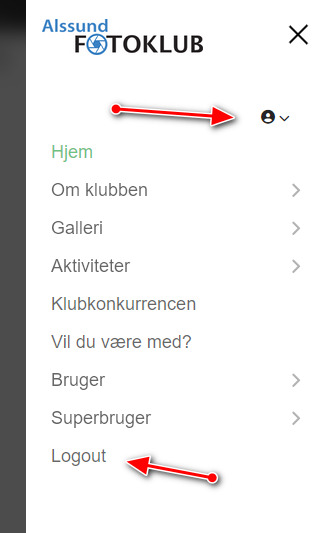
As last menu item in Mobile Menu add "Logout" menu link (from Users tab) set visible only for Registered users. And no problem, easy to see and "touch". I set it already. You can do the same with Profile link.


Indeed, the icon profile link was designed mostly for desktop users. Needs improvments. I corrected a little bit. But after all it request a template code update.

Results of my actions

info_3797_2026.jpg

Leif Elsborg Asked this
8 months ago · edited

Thx It's working fine now after Paul's additions af a logout menu

To Paul, could you tell me what you changed besides the new logout menu? I have another page running on a different domain, and it has the same issue.”

Leif Elsborg Asked this

Hi, thanks for the explanation.

Log in to reply.