Columns stacking vertically instead of displaying in the same row (Newsberg template) - Forum | JoomShaper
Staff replied SP Page Builder

Columns stacking vertically instead of displaying in the same row (Newsberg template)

Asked by Europa en Suma 5 months ago Last activity 5 months ago

Hi everyone,

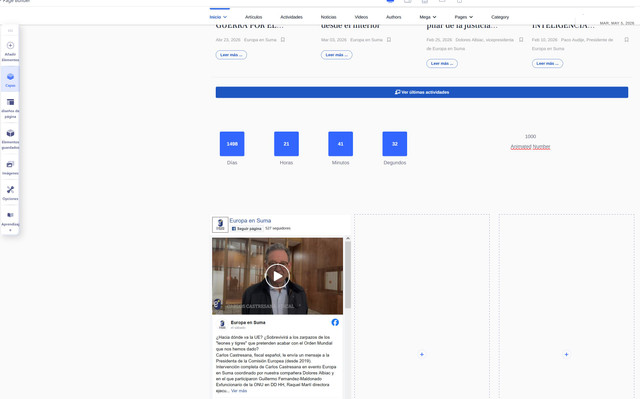
I’m experiencing an issue with the Newsberg template in Joomla/SP Page Builder.

When I create a section with 3 columns, instead of displaying side by side in a single row, all three columns are rendered one below the other (stacked vertically), even on desktop.

This happens even when:

The section is set to multiple columns (e.g., 3 columns layout)
There are no custom CSS rules forcing stacking
The screen size is clearly desktop (not mobile)

It looks like the columns are behaving as if they were in a mobile breakpoint, but they are not.

Has anyone experienced this issue with the Newsberg template or Helix Ultimate?
Could it be related to a layout setting, container width, or some CSS override?

Thanks in advance for your help!
Here a screenshot of builer:
[img]https://i.ibb.co/wFTN0XFw/cap1.jpg[/img]
And here how it looks:
[img]https://i.ibb.co/7x7vw7Hd/cap2.jpg[/img]

2 replies

Atick Eashrak Shuvo Staff

Hi,

Apologies for the inconvenience.

Could you please share the page URL where the issue is occurring? Also, the shared screenshot link does not appear to show any screenshot. Kindly recheck and provide a valid screenshot so we can better understand the problem.

Looking forward to your response.

Atick Eashrak Shuvo Staff

Apologies for the inconvenience. I can see that you are using a Facebook iframe through the Raw HTML addon. In this case, the content is expected to behave this way, as it is rendered directly from the embedded iframe.

Log in to reply.