URL Link type for Travelia and others - Forum | JoomShaper
Staff replied General

URL Link type for Travelia and others

Asked by Preamble 5 years ago Last activity 5 years ago

We are updating content with the Travelia template Quick start we purchased and notice the Menu item PAGES > Coming Soon which is a URL type link to ?tmpl=comingsoon
Witch loads a page with the Countdown Timer.

My question is where would we adjust the countdown add-on?

I dont see this as a PageBuilder page, there is no page with the extension created.

Could you explain this link designation and what it is pointing to(How it works) ?

3 replies

Ofi Khan Staff

Hello Preamble

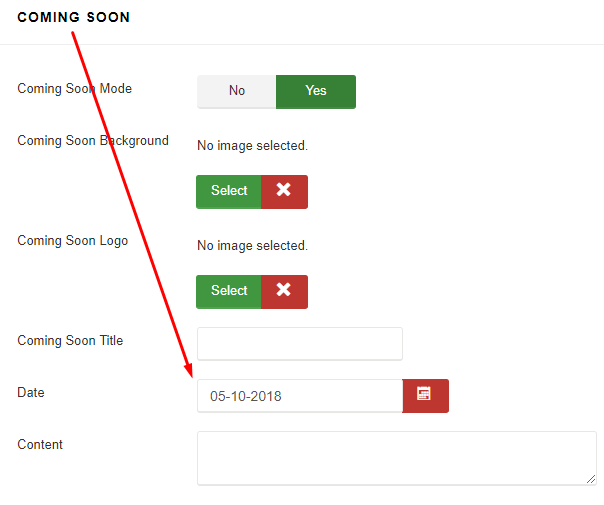
Please go to Template Basic Settings -> Coming Soon and set the date. You will find other settings there as well (like images, contents for Coming Soon page)

Screenshot_520.png

Best regards

Preamble Asked this
5 years ago · edited

Greetings, thank you for the quick reply however, in the Travelia Quick start template (Dynamic Page) we are using, that option is NOT enabled...

https://we.tl/t-ojjRvSZDSX

Is there a page that I can adjust, or would I just create a New PageBuilder Page and add the extension to that?

Ofi Khan Staff

All the settings are there. You can set Coming Soon page there. Or you can edit in templates\shaper_travelia\comingsoon.php

Log in to reply.