Page Builder Settings Problem - Forum | JoomShaper
Solved SP Page Builder

Page Builder Settings Problem

Asked by Martin 3 years ago Last activity 2 years ago

Hello Joomshaper Team,

I tried to hide the following tags in the source code. Page Builder settings: disable open graph is checked.

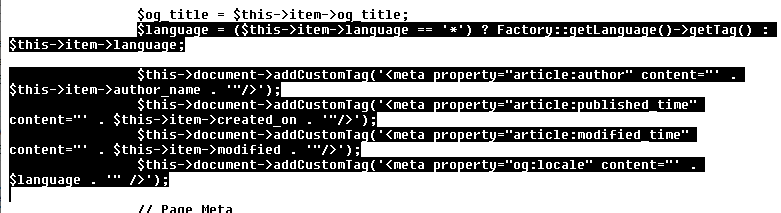
<meta property="article:author" content="martin23"/>
<meta property="article:published_time" content="2022-12-07 13:36:12"/>
<meta property="article:modified_time" content="2023-08-05 08:27:19"/>
<meta property="og:locale" content="de-DE" />

Where can I edit this because of security.

Thanks Martin

Accepted answer

Marked as the solution
Paul Frankowski Senior Staff
3 years ago · edited

Hi Martin,

I am afraid you cannot disable that by now, I will ask to add ON/OFF - it was created for SEO purposes, so 99% of users need that.

But you can cut off from component code, edit that file:

components\com_sppagebuilder\views\page\view.html.php

and remove marked code

del.gif

Martin Asked this

Hi Frank,

thanks a lot for your answer.
It is the first time I get a helpful solution without sending admin access...

Have a nice day

Martin

1 more reply

Alex

Why is this not disabled (or included) when you check Disable open graph in Page Builder settings? Is there a reason why you can disable the other open graph settings, but not these ones?

Log in to reply.