Video Addon not working properly - Forum | JoomShaper
Staff replied SP Page Builder

Video Addon not working properly

Asked by doug raught 5 years ago Last activity 5 years ago

Hi, I've added the Video addon. I have disabled Vimeo/Youtube and enabled "Turn on MP4 Video". I want to host the video on my site for complete control.

The video appears and plays fine in my Frontend Pagebuilder editor. But it will only play/stream video live on Internet explorer. I am unable to get it to play on Safari, Firefox and Chrome.

I converted the MP4 file to OGV and tried that method, but I get the same results. I will include the url in the hidden content area for you to perusal. I've exhausted all of my ideas to fix this.

Thanks for your help :-)

9 replies

doug raught Asked this

I think I understand the problem. Maybe someplace in the documentation it shares this information. Here's what I learned:
Each browser handles video differently.
IE will let you autoplay a video with sound automatically upon loading the website. (without controls)
Other browsers are not so friendly. They let you auto play the video, but only with audio muted. Or you can show controls then you have different options. Not so friendly IMHO.

Paul Frankowski Senior Staff

HI,
sorry but every webmaster should know that IE11 last time was updated 6 years ago.
No more support also from Microsoft. That's why they strongly promote Edge.

Video addon is Ok, IE is not anymore.

Heike Schulz

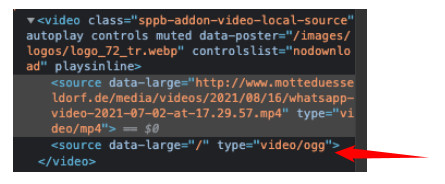
I continue this thread because I have the same issue but not the same solution (yet). In backend my mp4 plays fine but not on the live site. I guess it is because of its <source> tag which has a src="/xyz" attribute in backend but not in frontend. Here it says data-large="xyz".

With "frontend" it's meant the live site. Not frontend editing. This works as mentioned.

DOM while editing

DOM on live site

Paul Frankowski Senior Staff
  1. What template you're using there? Maybe video addon was overriden.

  2. Is this video addon or video in the row?


2nd line is only for .ogg video format, not mp4.

Heike Schulz

Thanks for your answer,

  1. I'm using a template custom build by my own.
  2. It is the video addon. Is there another way to insert videos?

And actually I mean "data-large" attribute from this mp4 video, not ogg. So while editing it is src:

<video class="sppb-addon-video-local-source" autoplay="" controls="" muted="" poster="http://motteduesseldorf.de/images/logos/logo_72_tr.webp" controlslist="nodownload">
    <source src="http://www.motteduesseldorf.de/media/videos/2021/08/16/whatsapp-video-2021-07-02-at-17.29.57.mp4" type="video/mp4">
</video>

On live site it has changed to data-large:

<video class="sppb-addon-video-local-source" autoplay="" controls="" muted="" data-poster="/images/logos/logo_72_tr.webp" controlslist="nodownload" playsinline="">
    <source data-large="http://www.motteduesseldorf.de/media/videos/2021/08/16/whatsapp-video-2021-07-02-at-17.29.57.mp4" type="video/mp4">
</video>

And when I insert a HTML addon with following code (with src) it will work, too (while editing and on live site:

<video data-poster="/images/logos/logo_72_tr.webp" autoplay muted>
    <source src="http://www.motteduesseldorf.de/media/videos/2021/08/16/whatsapp-video-2021-07-02-at-17.29.57.mp4" type="video/mp4">
</video>

Hope this will help.

Heike Schulz

I had to replace “data-large“ with “src“ so it worked. But why is this addon's code written like that so it won't work until replacing code by the user?

Paul Frankowski Senior Staff
5 years ago · edited

Good question, but the code wasn't written by me.

Sure, I will ask dev team. Thx

Paul Frankowski Senior Staff
5 years ago · edited

I have good news for you in SPPB 3.7.15 update (READY) we fixed empty line issue.

foto_6707_2021.jpg

But I tested SPPB on few pages, and we don't have "data-large" code anywhere -- only "src" is used in addon code.

Log in to reply.