Size of carousel Termplate Shaper Empire - Forum | JoomShaper
Solved Templates

Size of carousel Termplate Shaper Empire

Asked by ClinicaMicro 5 years ago Last activity 5 years ago

Good afternoon, How can I change the default size in the properties carousel? I mean, when you enter a property, the images that appear, the screen is divided into 3 and the images are cut off. Is it possible to change the size of the carousel? Make for example that the photo is not so high and that it is for example wider.
https://postimg.cc/G885yT5C

https://postimg.cc/MvHHCWNQ

I don't know how to insert an image, I put the link

Accepted answer

Marked as the solution
ClinicaMicro Asked this

BUeno, como veo que no leen ni contestan a las cosas, ni me molesto en traducirlo. He optado por cambiar la plantilla. Gracias.

9 more replies

Mehtaz Afsana Borsha Staff

Hi,
Could you please give me that specific page link

Mehtaz Afsana Borsha Staff

do you want to change the height or width of the carousal?

ClinicaMicro Asked this

I want to resize the photo that comes out in the middle, the photo comes out cropped. I upload the rectangular photos, and they come out square. It would even be worth it if only one photo came out. In the photos that I attached, I explain it.

Mehtaz Afsana Borsha Staff

Hi,
Use this custom css

.owl-item{
  width:480px !important;
}

In Extensions>Template> Template Options > Custom Code > Custom CSS please add this
Thanks

ClinicaMicro Asked this
5 years ago · edited

Good Morning. Does anyone test things before putting them around here? See the results. Either we have not understood each other or I do not understand what is happening.

https://postimg.cc/R3bb7nn2

https://postimg.cc/phhcqXfr

I don't want to modify the height of the carousel, I want to modify the size of the image, so that it is not cropped when uploading it.

Ofi Khan Staff

Hello ClinicaMicro

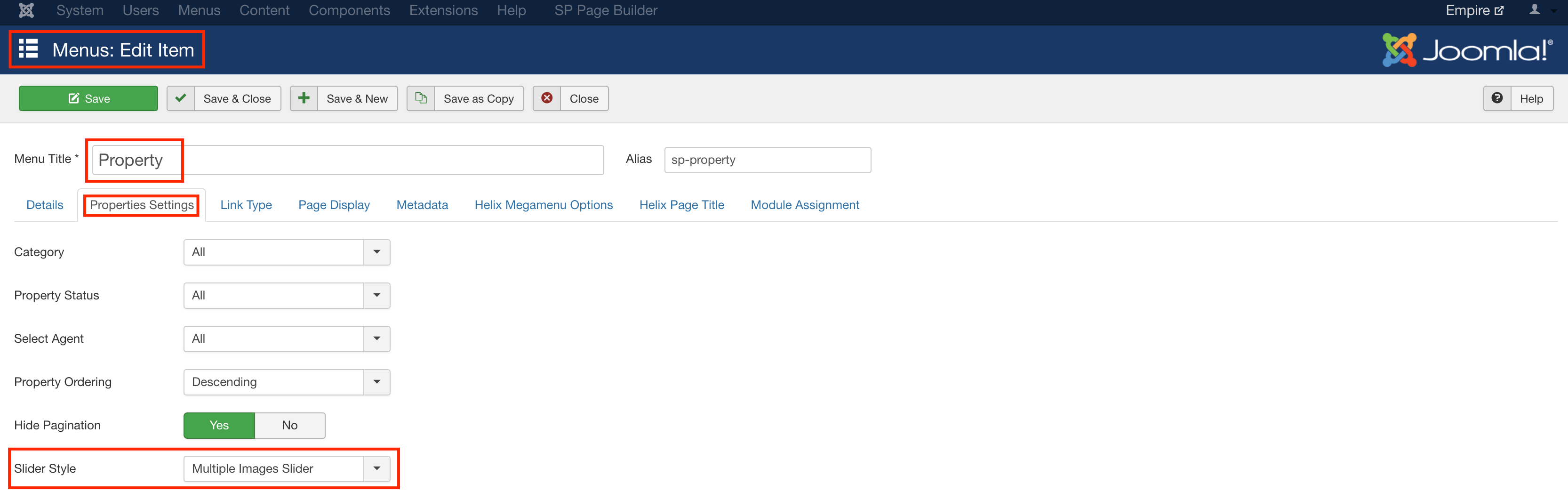
Apology for your experience with us. You can change the slider image style in the menu item settings. Go to Property menu item and change the slider style.
Screenshot at Mar 25 13-30-51.png

Best regards

ClinicaMicro Asked this

That also does not solve the problem with the photographs on the property, I have changed to the "estate" template and in this one they look differently and it does not deform the images. I consider the issue settled.

Thanks Ofi Khan.

Ofi Khan Staff

You are welcome.

Log in to reply.