http://j1.cdx.pl/
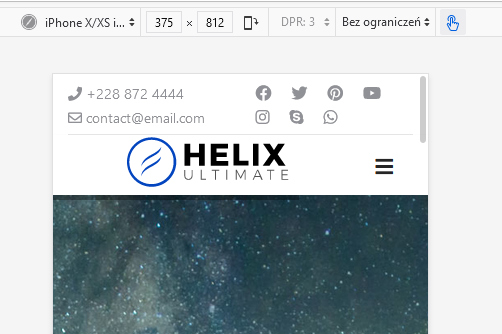
mobil version - does not center
How to do it ?

code css not work ;-( #sp-logo, .sp-column, .logo, .logo-image { text-align:center !important;}
Staff replied
Helix Framework
center logo helix ultimate2.0.0-alpha.5
4 replies

Paul Frankowski Senior Staff
Hi,
- Change column width in mobile view, now logo has "6" like icon =. It means it's not possible to center.
- Set column size "10" for logo - for mobile view and "2" for logo column
- Use this custom CSS for mobile view only
@media (max-width: 580px) {
#sp-logo {margin: 0 auto;}
}
Efekt po
Tomasz Michałowski Asked this
and where to set the point 1,2 . I added the code but it doesn't work
Paul Frankowski Senior Staff
5 years ago
· edited
Tip for beginners:
- You have to use/create a custom header - not predefined. Exactly as it was it previous version of Helix.
Predefined header you can disable in "Basic" - "Header" - "Predefined Header" : Off. Then you have full control over grid settings for all views (mobile/tablet/desktop).
But remember that it's still Alpha version (!)
So maybe instead of point 0) - right now more advanced custom CSS is needed. For example:
 @media (max-width: 580px) {
 #sp-logo {
    margin: 0 auto;
    width: 80%;
    text-align: center;}
        }
Paul Frankowski Senior Staff
Tested more advanced code and worked without any extra steps.
Log in to reply.