Hi, In SP Page Builder Pro if I save a row (with all the content) I can call it from mysection, OK. In SP Simple Portfolio, if I save a row (with all the content) afterwards, how should I do to be able to recall it in another row? Thank you. With best regards
Staff replied
Extensions
Row in SP Simple Portfolio with SP Page Builder Pro
24 replies

Ofi Khan Staff
Hello SALVATORE
You can do it the same way as in SP Page Builder. Save the row and give it a name. Then you will find it in My Sections on SP Page Builder editor.
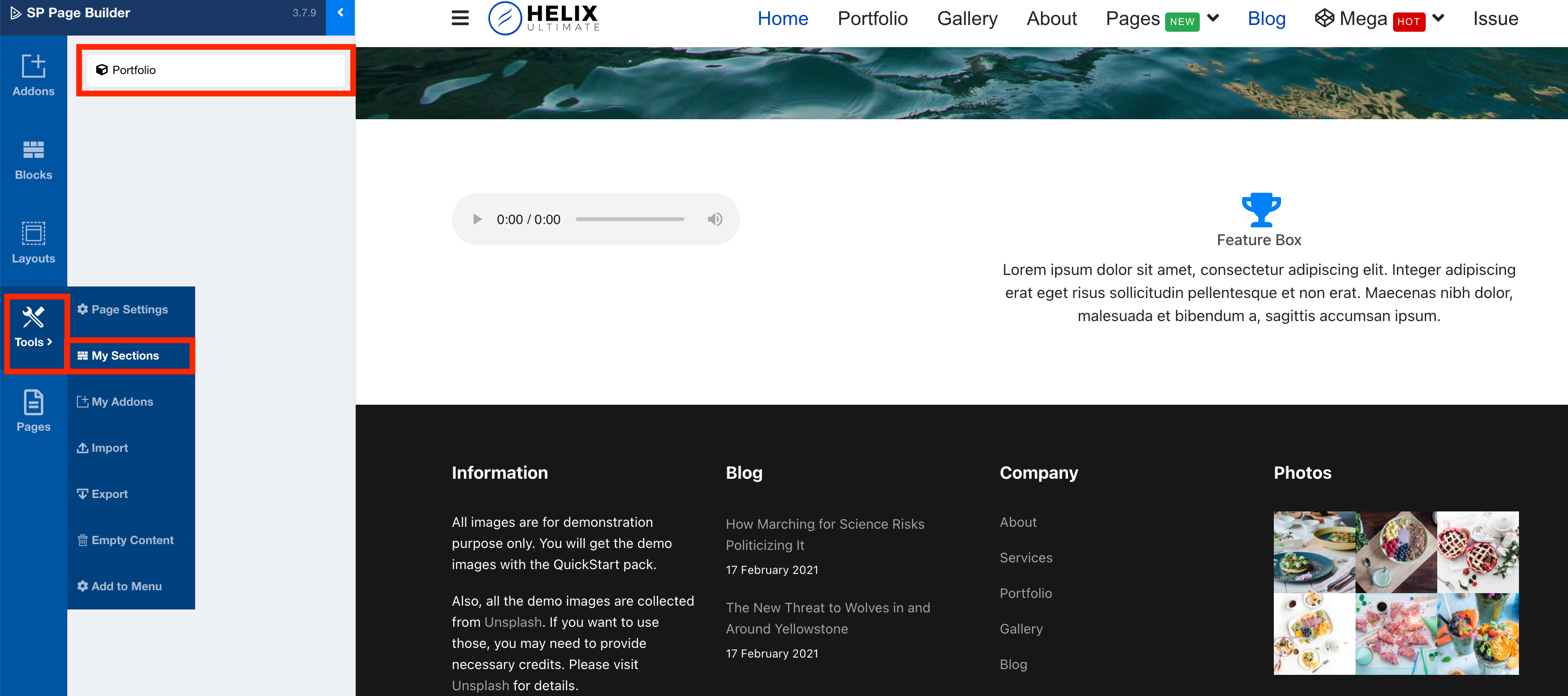
Best regards
SALVATORE Asked this
Hi, I followed your suggestion, but it didn't work. Le Row in page building (with SP Page Builder Pro) has always worked and still works. With Simple Portfolio I can save the Row but then when I open the “my section” from the “tools” position I find only the Row of the pages previously saved with SP Page Builder but not the last ones saved with Simple Portfolio. Why? Best regard
Ofi Khan Staff
Please check if your SP Page Builder and SP Simple Portfolio is updated or not.
SALVATORE Asked this
Hi, I checked SP Page Builder Pro and the version is updated to 3.7.9 while for SP Simple Portfolio the updated version is 2.0. Joomla is also updated to 3.9.22. Regards.
Ofi Khan Staff
Please share your administrator access here to check the issue. Use the Hidden Content box to share the credentials.
SALVATORE Asked this
Hello Ofi The site we are talking about is in localhost (luckily!), So I am sending you the following link
https://drive.google.com/file/d/1byTgrCBXjtQ-3-f9TULsyh6nM0k7WJ4s/view?usp=sharing
i have posted the access data in the private area.
You may notice that saving the Row with SP Page Builder Pro works (which I regularly find in “my section”) but when I save the Row from the Simple Portfolio location I no longer find it in “my section”.
This problem does not happen with other templates (Konstra, Indigo) that I installed with Quickstart while Decora I installed with Onecklik. Maybe this is the problem? I hope you fix it for me.
Greetings
Ofi Khan Staff
Please take a backup with Akeeba Backup in ZIP format and share here. Follow this tutorial
SALVATORE Asked this
Hi, as requested I am sending you the link of localhost (Akeeba Backup in ZIP format)
https://drive.google.com/file/d/12BQGLekkv3ZBJL5cSqzdOo0Zc04D6joz/view?usp=sharing
Greetings
Ofi Khan Staff
Your issue is fixed. Please install this backup on your server. Follow this tutorial.
SALVATORE Asked this
Hi OFI, I followed your instructions but the akeeba backup file you sent me doesn't work. I've tried everything but the answer is always this.
Database restoration
An error occurred while restoring the database. The error message can be found below. Click on the × button at the top right of this dialog message to close it and return to the database restoration page.
Incorrect table name '' SQL=DROP TABLE IF EXISTS ``
Can you kindly check? Greetings
SALVATORE Asked this
Hi OFI, are you okay? I hope so! After your last message of 28 March 2021 and my reply of 31 March 2021 I have not read you anymore. You can kindly answer me. Thank you and greetings.
Ofi Khan Staff
Apology for the delay. I am okay. Thanks for asking. When you are restoring the database, you need to give username, password and a database name(it will be created on your server). For windows, use username: root and password: (leave it empty) and for mac, use username: root and password: root.
SALVATORE Asked this
Hi Ofi, I'm glad to know you're okay so I can talk. In the previous message I told you that I have followed Your Instructions (which you have now replied to me) and that I could not install your akeeba file due to the error I reported to you. Obviously, we didn't understand each other. However, I tried again as you said, but the error persists! As I am convinced that an image is worth a thousand words, I am sending you this link:
https://drive.google.com/drive/folders/16WO-YZM8elJiEz1SJbuaDLl5okVEzQFC?usp=sharing
Where you find a folder with 3 img that illustrate the various steps of the installation:
- Img 1 installation start with Akeeba baskup;
- Img 2 database writing error:
- Img 3 the demonstration that Akeeba backup can only write 2 tables and then crashes.
Can you kindly correct the error I reported to you? Thank you and greetings
SALVATORE Asked this
Hi Ofi, I have lost contact with you again. I guess you forgot. You can kindly reply to the discussion referred to in the links:
https://www.joomshaper.com/forum/question/2433#qa-answer-13643
IS
https://drive.google.com/drive/folders/16WO-YZM8elJiEz1SJbuaDLl5okVEzQFC?usp=sharing
Thank you and greetings
Ofi Khan Staff
Please use another database table name.
SALVATORE Asked this
Excuse me Ofi because you continue to give answers of the "fife" if you do not even read what I write to you. The Akeeba backup file you sent me on March 27, 2021 (14:12) contains an error that has nothing to do with the Akeeba backup installation procedure you are referring to. Before your file I received from Mr. Toufiq, on February 26, 2021 (08:21) an Akeeba backup file that (with the same procedure and with the same tutorial) worked and still today (every time I reinstall it) IT WORKS! Why is your file not working? Can you answer this question?
Ofi Khan Staff
My apology! The backup is not working for me too. I could not find the issue. Anyway, please try this fix on your site. Go to your database and run this SQL Query
ALTER TABLE xxxxx_sppagebuilder_sections CHANGE id id BIGINT(20) UNSIGNED NOT NULL AUTO_INCREMENT;
Use your table prefix instead of xxxxx
SALVATORE Asked this
Hi OFI, I'm glad to hear from you that the Akeeba file (a month ago you said problem solved) is corrupt and, therefore, not working. Even now I have tried to execute your instructions but the result is always negative, in fact even akeeba backup no longer works.
I am sending you the site folder at the following link:
https://drive.google.com/file/d/1vnIieFS8u79vjgYfPgsxHLgOXFw01gte/view?usp=sharing
while the database is at this link: https://drive.google.com/file/d/1DsmatFQ03PLMyP6FSrb84Ol9UfpouHig/view?usp=sharing
The access data are in the reserved area.
The site in localhost is working, net of the problem under discussion (Simple Portfolio –Row saved-disappeared). You can see that the contents are many and it is unthinkable to do it all over again. If you think you can solve the problem quickly, great! Otherwise, forget it, however, please inform me. In this respect, best regards
Ofi Khan Staff
I have shared the fix with you. Go to your database and run this SQL Query
ALTER TABLE xxxxx_sppagebuilder_sections CHANGE id id BIGINT(20) UNSIGNED NOT NULL AUTO_INCREMENT;
Use your table prefix instead of xxxxx
Or just go to xxxxx_sppagebuilder_sections table id column and turn on Auto Increment
SALVATORE Asked this
Hi OFI, I state that I am not a programmer (after more than 2 years from Mister Frankowski to Mister Toufiq and all the staff of Specialist Support, they know) so I faithfully follow the instructions you gave me. This time too, the outcome is negative. The demonstration can be found at the link.
https://drive.google.com/file/d/1iFesdU6s1ZfTKdatmhYdd67_OscOjic8/view?usp=sharing
Nothing works! Even Akeeba backup doesn't work anymore (after I tried to upload your file - corrupt - that you too could not open)! That's why, last time, I sent you the site folder and the db.
Now that you have my dB (working!), Kindly, can you do the tests you think are useful to solve the problem and send me the correct db? Thank you. Regards.
SALVATORE Asked this
5 years ago
· edited
Hello OFI, I see on this blog, that my request (last 29-04-2021) for technical intervention on a problem that you have never solved has remained without any kind of response. I understand that the global Covid-19 pandemic has shocked people's heads, but I can't understand your bad upbringing, because it is not the first time you have behaved this way. Can't solve the problem? Can't even the "wonderful joomshaper staff"? Just tell me, so I understand that I was wrong in evaluating joomshaper and its products.
Ofi Khan Staff
5 years ago
· edited
I am really sorry for this. Your issue was a bit weird. Things worked on my localhost but Akeeba Backup has some issues with it.
Please update SP Page Builder 3.7.10. This should solve the issue. If not, please share your credentials again.
SALVATORE Asked this
Hi OFI, I followed your instructions (SP Page Builder Pro update to version 3.7.10) but the problem with the row saved with Simple Portfolio, remains the same as repeatedly complained. The save (is saved regularly) but when I go to Tools> mysections I can't find the row just saved. Below I propose again the credentials that are the same as the previous ones to which you have not answered.
https://drive.google.com/file/d/1DsmatFQ03PLMyP6FSrb84Ol9UfpouHig/view?usp=sharing
https://drive.google.com/file/d/1vnIieFS8u79vjgYfPgsxHLgOXFw01gte/view?usp=sharing
https://drive.google.com/file/d/1iFesdU6s1ZfTKdatmhYdd67_OscOjic8/view?usp=sharing
The explanation can be found in this same chat in the message of last April 22nd. I await your definitive answer to this problem. Regards.
Ofi Khan Staff
Thanks for your detail screencast. In your sppagebuilder_sections table, there is a row with id 0. Delete the row or just change the id to any number (that is not reserved in the table). Then try the SQL query. Your table must not have any row with id 0. Then it should work. Please let me know the outcome.
Log in to reply.