I work with the Manufacturer template. I need to modify the contact page. I need to remove the image on the right. Which file should be modified. Thank you for your help
Staff replied
Templates
Manufacturer template
5 replies

Ofi Khan Staff
Hello Pomaret
Please share a screenshot of your issue to understand it better.
Best regards
Pomaret Asked this
here are the screenshots

https://www.pominfo.fr/images/image1.jpg
https://www.pominfo.fr/images/image2.jpg

I want to remove the red zone and centre the module in the page
Best regards
Ofi Khan Staff
Please go to Extensions -> Modules and turn off Login Left module.
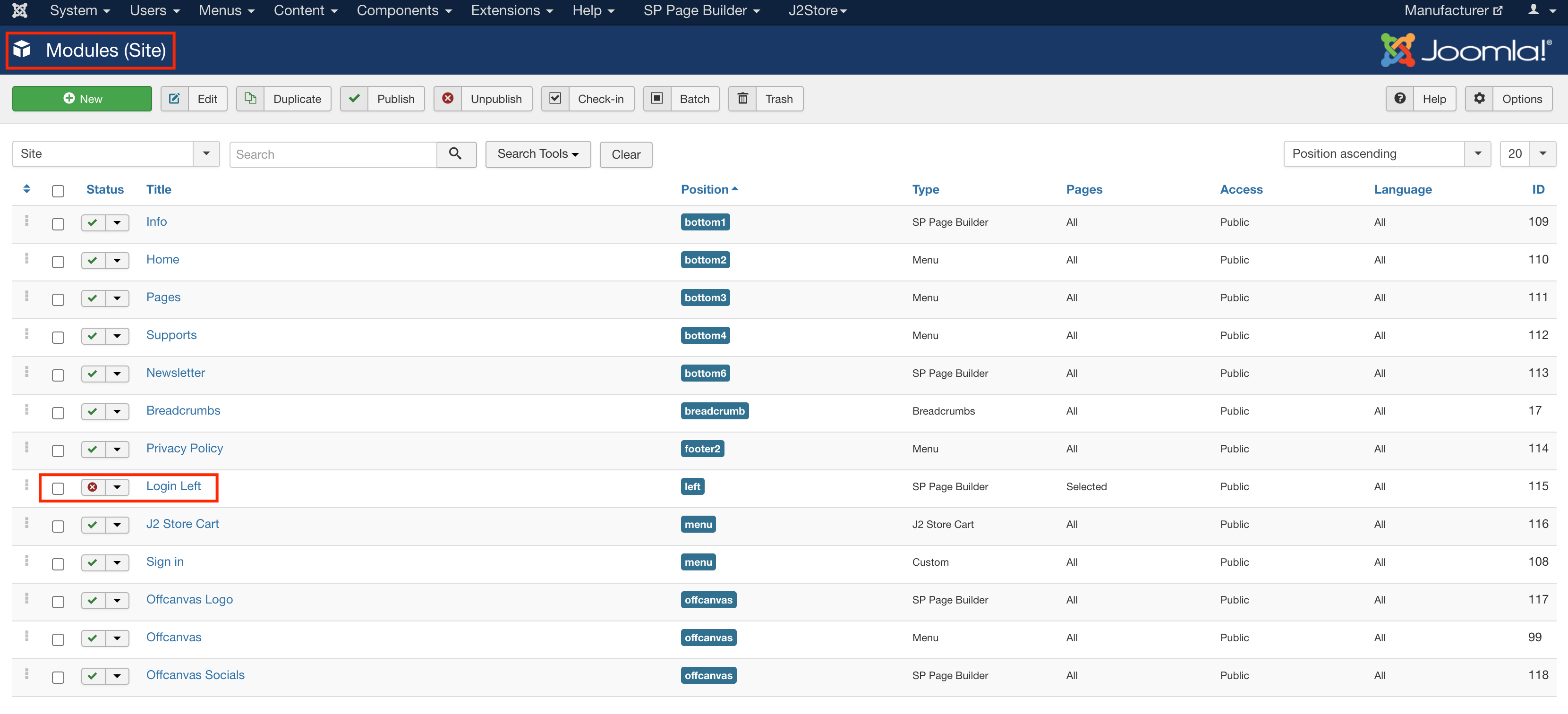
Use this CSS to Template Options -> Custom Code -> Custom CSS
@media only screen and (max-width: 2560px) {
  .view-login #sp-component, .view-registration #sp-component{
    position: relative;
    left: 30%;
  }
}
@media only screen and (max-width: 1440px) {
  .view-login #sp-component, .view-registration #sp-component{
    position: relative;
    left: 20%;
  }
}
@media only screen and (max-width: 425px) {
  .view-login #sp-component, .view-registration #sp-component{
    position: absolute;
    left: 0%;
  }
}
Pomaret Asked this
great, thank you very much
Ofi Khan Staff
You are welcome
Log in to reply.