Articles are shown double - Forum | JoomShaper
Solved Templates

Articles are shown double

Asked by Wiebe 5 years ago Last activity 5 years ago

Hello,

We use your template Podcast for a client, but something strange happens. When we publish an article, it will be shown twice.

You can have a look here, and then click on the image: https://medic.uwwebontwerp.nl/over-ons/blog

Can you tell me how to get rid of the part at the bottom? I'm already trying to solve this for 4 hours (really, 4 hours!!), getting frustrated.

When I use your Finance template (I installed this to see what happens), it shows only once, so I figure it has something to do with the Podcast template.

Hope you can help, thank you so much.

Kind regards,
Wiebe Werkman

Accepted answer

Marked as the solution
Ofi Khan Staff

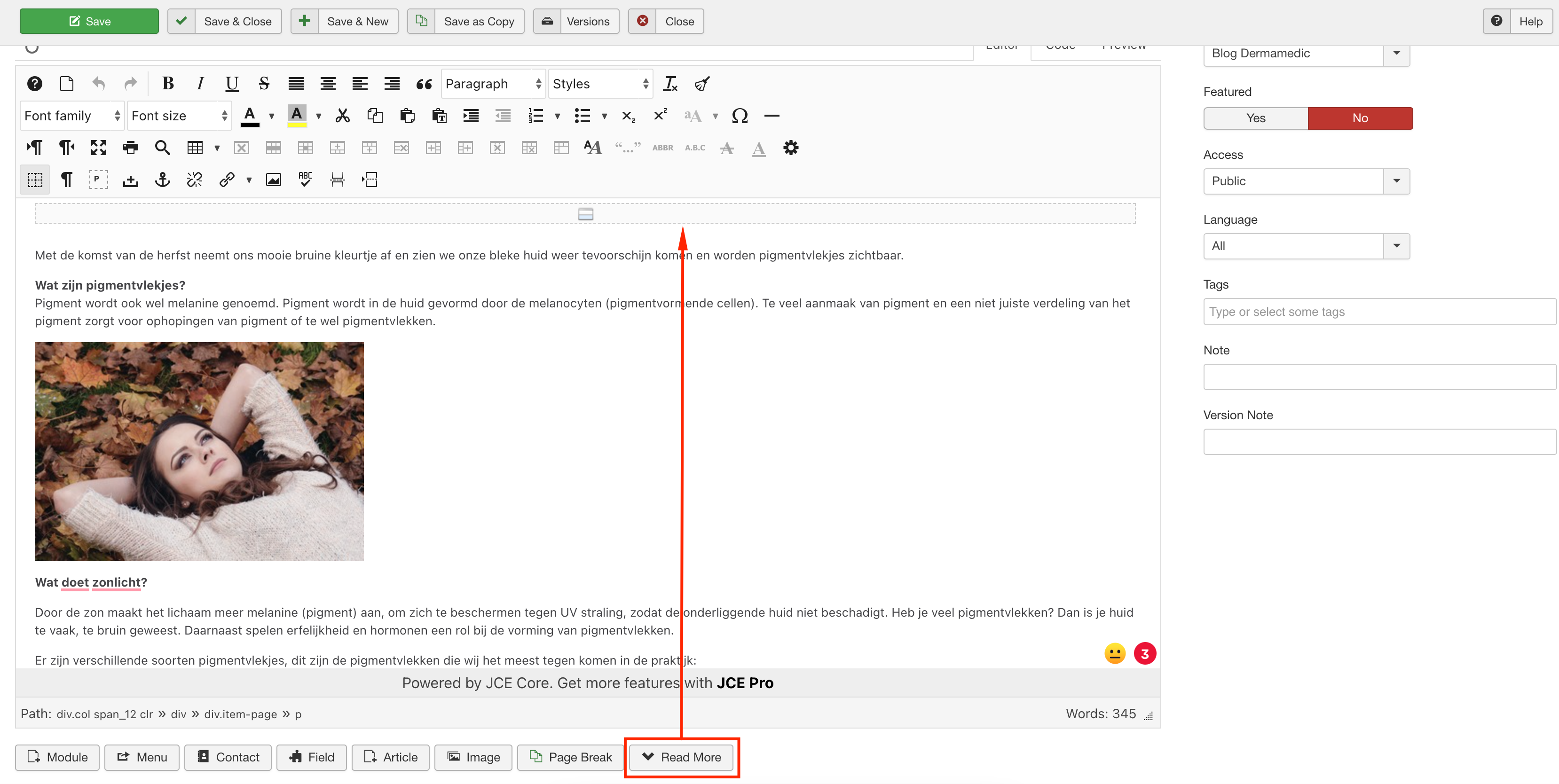
Your issue is fixed now. Please check your site. I have added a readmore to the article.
Screenshot at Mar 22 15-39-30.png

27 more replies

Ofi Khan Staff

Hello Wiebe

Please share your administrator access here to check the issue. Use the Hidden Content box to share the credentials.

Best regards

Wiebe Asked this

See my hidden reply

Ofi Khan Staff

Your issue is fixed now. Please check your site.

Wiebe Asked this

Hello,

The issue is not solved, where is the logo, why are the custom fonts gone, where are the social icons righthand corner?

Can you please change it back, also the blog is not what it was (okay, the double issue is gone, but that was something I could do myself by installing antoher template....). Share on mustn't be published and the 'recommended episodes' ??

Please, can you put the right side back, and fix the blog in THAT template, thank you, I would like to start working on this site now, thank you in advance.

Ofi Khan Staff

okay, I reverted it back. I will try another solution.

Wiebe Asked this

Thank you, I will make all new blog items with that in mind. Strange that we need to start with a <read more> but if that does the trick, okay by me.

Can you take another look, I noticed the TikTok icon (upper rightside) is missing when I click on 'blog' and/or it's looking different now. Can you look at it and fix that (was an issue, fontawesome wasn't added correctly in this template i heard).

Thanks Ofi, you helped me a lot today!

Kind regards,
Wiebe

Wiebe Asked this

Sorry, one more thing. The alignment is not as I would like it, when clicking on a blog item. How can we make this the same size as the other pages, it's now to small, to much white area left and right.

Like to hear from you, we are getting there :).

Ofi Khan Staff

Article white space issue is fixed. I am checking your tiktok font issue.

Wiebe Asked this

BIG THANK YOU to you, what a great support!!!

Wiebe Asked this

When you've got the time, can you take a look at the homepage, reviews. The name is very small, can you tell me (I'd like to learn how to fix this) how I can adjust that font, so those names will be bigger?

Thanks,
Wiebe

Log in to reply.