Helix Beta Bug - Forum | JoomShaper
Staff replied Helix Framework

Helix Beta Bug

Asked by Andrew Freeman 5 years ago Last activity 5 years ago

Hey,

using Safari Version 13.1.3 & Chrome Version 89.0.4389.90 (Official Build) (x86_64). Created using quickstart and running through MAMP on Mac.

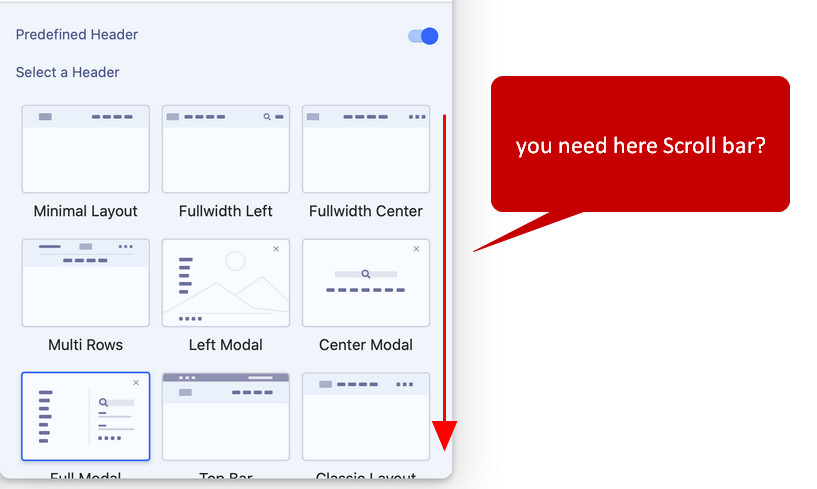
  1. There doesn't seem to be a scroll bar in the menu to scroll down to options not showing within the widow. I can move down with arrow keys but not the mouse?

https://ibb.co/8KxBGSz

  1. In Safari I'm just seeing a white background, yet the exact same site in Chrome shows the background.

https://ibb.co/8467RPJ

  1. When I enter an amount into the header height box and press return it brings up this

https://ibb.co/2j4gkBX

  1. If I enter a logo height greater than the height of the bar, this happens. The logo comes outside the menu bar.


https://ibb.co/vzgTPKw

6 replies

Sajeeb Ahamed Staff

Hello @freeman,

Thank you for your observations. In the response-

  1. I don't understand your first problem.
  2. Download the package once again from https://github.com/JoomShaper/helix-ultimate/releases/download/v2.0.0-beta.1/2.0.0-beta.1.zip and install it on the top of the previous one.
  3. I've checked and enter an amount into header height box and press return. Nothing happened. Coluld you please elaborate how to reproduce the problem?
  4. There is no calculation between header height and the logo height. You should not set larger value for the logo height than the header height.

Note It would be greate if you raise an issue at github with proper example.

Paul Frankowski Senior Staff

ad 4) Yes, in some cases - some users wants that logo would be beyond the header. So we have to keep it.
As Sajeeb said, in normal cases - just use logo value smaller (at least 6px) than header height.

Paul Frankowski Senior Staff

ad 1) Correct me if I am wrong.

foto_5930_2021.jpg

Andrew Freeman Asked this
  1. If you look at the screen shot. I'm in the "header" section, but the only way to get to "Full Modal", "Top Bar", "Classic Layout" options is with the keyboard arrow keys, there is no scroll bar on the menu or a way of making it dragging it to make it bigger so that I can see all the options at the same time.
  2. I will try
  3. I just entered a number into the header height box and hit enter on my keyboard and that box keeps popping up.
  4. Understood, just felt clunky as I don't remember it doing that in the current Hellix. I get people wanting it bigger so that's fine.

Will add to github from now on. I did ask Chat support where I should post them and they said here, thanks for pointing in the right direction.

Andrew Freeman Asked this

Paul,

  1. I think that would be useful.

My first reaction was to try and find a scroll bar there.
My second reaction was to try and grab the edge of the box and maximise it to show the other options.

Paul Frankowski Senior Staff

We publish beta/alpha to collect criticism, ideas and suggestions - so big thanks.
I am pretty sure that on Monday our team will read it.

Log in to reply.