Helix Ultimate doesn't load all available font weights - Forum | JoomShaper
Staff replied Helix Framework

Helix Ultimate doesn't load all available font weights

Asked by Krachtstroom 5 years ago Last activity 5 years ago

Hi.

I use a Google font which I select in the style options of Helix Ultimate. This is a font with a lot of weights.

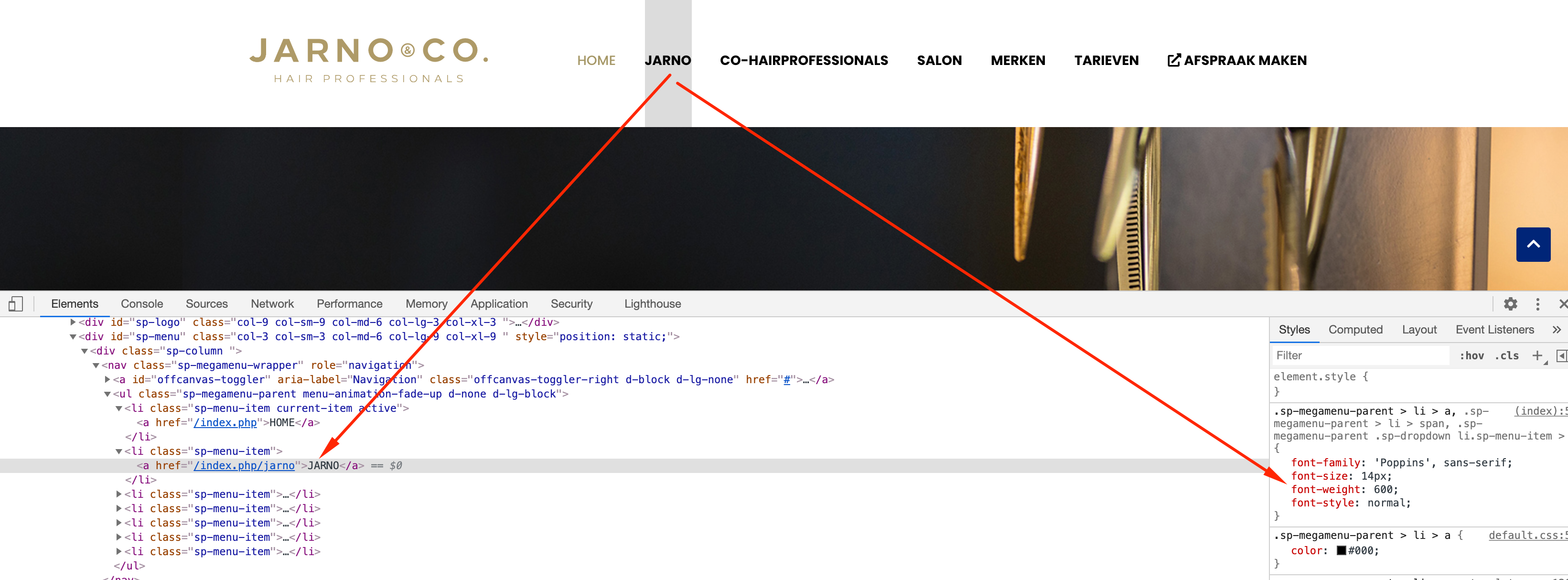
Discovered that although I selected the right weight (Semi Bold which is 600) the font on my page is actually the font weight 700.

Looking into the head section of my code I can see that font weight 600 is not loaded.

Updated my Google fonts list but that do the trick.

How can I be sure that the right fonts are loaded?

26 replies

Ofi Khan Staff

Hello Krachtstroom

Please share a screenshot of your issue to understand it better.

Best regards

Krachtstroom Asked this

Hi Ofi,

This is the line in my header: <link href="//fonts.googleapis.com/css?family=Poppins:100,100i,300,300i,400,400i,500,500i,700,700i,900,900i&amp;display=swap&amp;subset=latin-ext" rel="stylesheet" type="text/css">

As you cansee the Poppins 600 and 600i are not loaded. And that's exactly the font I need. Strange thing is that I can choose for it in the dropdown list/settings in the Helix Ultimate styles (600 = semibold). The font is available in semibold/600 at Google.

Hope to hear soon.

Ofi Khan Staff

Please share your administrator access here to check the issue. Use the Hidden Content box to share the credentials.

Krachtstroom Asked this

Hi Ofi,

Here it is

Krachtstroom Asked this

Anything?

Ofi Khan Staff

Sorry, I could not access your administrator URL. Please check this.

Krachtstroom Asked this

O yes, I forgot. If you give me your IP I can whitelist that one

Ofi Khan Staff

Here it is: 119.148.8.82

Krachtstroom Asked this

Hi Ofi,

I added this one to the admin whitelist, now you must be able to login.

Krachtstroom Asked this

Anyone?

Log in to reply.