Nuron: Mobile text size is too small - nowhere in the the settings to adjust the mobile font-size? - Forum | JoomShaper
Solved Templates

Nuron: Mobile text size is too small - nowhere in the the settings to adjust the mobile font-size?

Asked by Neil 2 years ago Last activity 2 years ago

I have a site using Nuron and the body text size is set to 16px in the template settings. This is great on the pages on desktop and tablet, but when on a phone the font size is too small.

Any idea on how I can adjust this in the settings or with some custom CSS?

Many thanks

Accepted answer

Marked as the solution
Paul Frankowski Senior Staff

HI Neil,

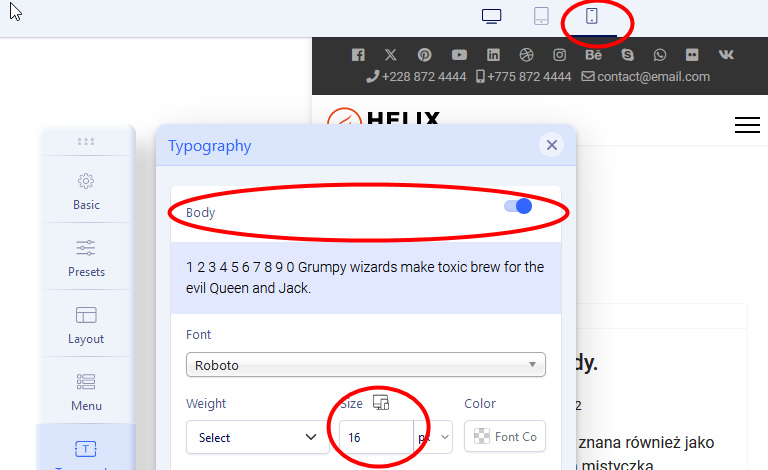
  1. Template Options > Typography > Body
  2. Now on top bar click "Mobile" icon
  3. In in Body change "Size" (font-size) for example use value 16 [px]

info_1965_2023.jpg

That's all

4 more replies

Neil Asked this

Hi Paul,

Ah! I didn't spot the mobile and tablet up there - thanks for the help.

I have managed to sort that out now.

I tried changing the H1, H2, H3 sizes on each of the formats and it doesn't seem to make any difference?

Paul Frankowski Senior Staff

If those H1, H2, H3 were set in SPPB you have to change in SPPB.

Templates settings are general.

Neil Asked this

They were not set in SPPB

Paul Frankowski Senior Staff

in that case try custom CSS, for example for Mobile:

@media screen and (max-with: 680px) {
h1, h1.article-details-title {font-size: 2.5rem !important; }
h2  {font-size: 2rem !important; }
}

remember that styles are used also from bootstrap!!

more guides in net

Log in to reply.