Hi,
- How do I change the logo of KeyNote template?
- Also how do I make the header to slide?
Hi,
ad 2) No relation. This position should exist in all templates based on Helix Ultimate.
And this template has it as well. Checked 60sec ago.
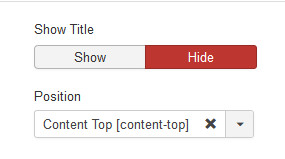
Just add there as first step "Custom" module with text: Test123.... working.
ad 3) Yes, and No.
No as a separate module, but if you have installed SP Page Builder.
You can use SPPB Module and use Slideshow addon from it.
But yes, any time you can install addcional slideshow module as well.
Hi,
ad 1) From KeyNote Template Options - Basic - Logo
where you have to upload and choose your own logo
ad 2) Section where there is a logo and menu - it's a real header - so I guess, you talk about section below it?
If yes, you have two options:
a) Using Slideshow module, or
b) Use SP Page Builder Page and one of addons is slideshow.
To be honest, using your recommendations, I could not change the logo, nor make a slideshow of the header.
Regards.
Ad 1) jpg is not format for logo, it has compression. My recommendation is to use png file.
Importanat TIP! If you installed Quickstart - it has 3 different template styles. So disable/delete those which you do not use, and keep only one. Less confusion. Then you should be able to change logo in current used template style. Many users makes this same mistake, and change logo in not current template.
Please upload png logo file to /images folder first. Then just choose it.
ad 2) I guess, you have to be Joomla beginner. Becuase it's very easy to find template layout - with all module structure.
The most easy way would be to use module position named "Content Top" - where your slideshow should be published.
Hello,
I have fixed the logo using png, as you advised. Thank you.
But I couldn't find the full module positions, so I couldn't find the "Content Top" position, probably because I updated to the latest version of Joomla! immediately after installing the KeyNote quickstart.
Does the KeyNote quickstart comes with a slideshow extension? Or do I need to install one from another developer?
And yes, I am a Joomla! beginner.
Worse is, I am unfamiliar with the SP PageBuilder. So I wonder, can I disable SP PageBuilder and just revert to the conventional Joomla! modules and plugings features?
Good support. Thank you.
Is there "SPPB Module" in the free version of SP Pagebuilder? I couldn't find it!
No, only in SP PB PRO.
Free = Lite = Limited.
