Addon: Divider field CSS Class - Forum | JoomShaper
Solved SP Page Builder

Addon: Divider field CSS Class

Asked by Edze de Boer 5 years ago Last activity 5 years ago

Hi guys,

Sometimes a client asks me to change some colors on his website.
So I started creating a CSS Class for the Addon: Divider:

divider_in_row_heading

For example on the homepage of www.taxieindhoven.org

In custom.css :

.divider_in_row_heading {
border-style: solid;
border-width: 3px;
color: #f17c0e;
}

Still I see a 1 px thin white line along the bottom of the divider.
What am I missing here?

Kind regards,
Edze de Boer

Accepted answer

Marked as the solution
Toufiq Senior Staff

Glad to know that, your problem is solved. Please close the ticket. Thanks

7 more replies

Pavel
5 years ago · edited

Hi. Divider addon uses not just a border property, but border-bottom property. It is this property that needs to be redefined and additionally add to the end of the record "!important", which would replace the styles tuned in the addon.
Use the browser code inspector to accurately define properties for override.
Also, you can use more compact entry.

.divider_in_row_heading {
    border-bottom: 3px solid #f17c0e !important;
}
Edze de Boer Asked this

Hi Pavel,

Thank you, it works excellent!

Kind regards,
Edze de Boer

Edze de Boer Asked this

I would close the ticket if I could. Can't find the Close button however.

Kind regards,
Edze

Edze de Boer Asked this

Hi guys,

About www.taxieindhoven.org

So I added a CSS Class to the Text Blocks of SP Page Builder.
On a normal PC screen the text is indeed white on a dark background, which is fine.
Also on my iPad2 the text is white.

However, on a mobile phone (Android), the text remains very dark.

The font-size in the Heading Add-on is not reacting to the change either.

What have I done wrong?

.heading_in_row_heading {
font-size: 72px;
color: #ffffff;
}

.text_block {
color: #ffffff;
}

Kind regards,
Edze de Boer

Pavel
5 years ago · edited

Hi. The class which you add to Addon is a parent class for all elements of the add-on. You need to create a composite selector to refer to the desired item. Use the browser code inspector to determine this.
For example:
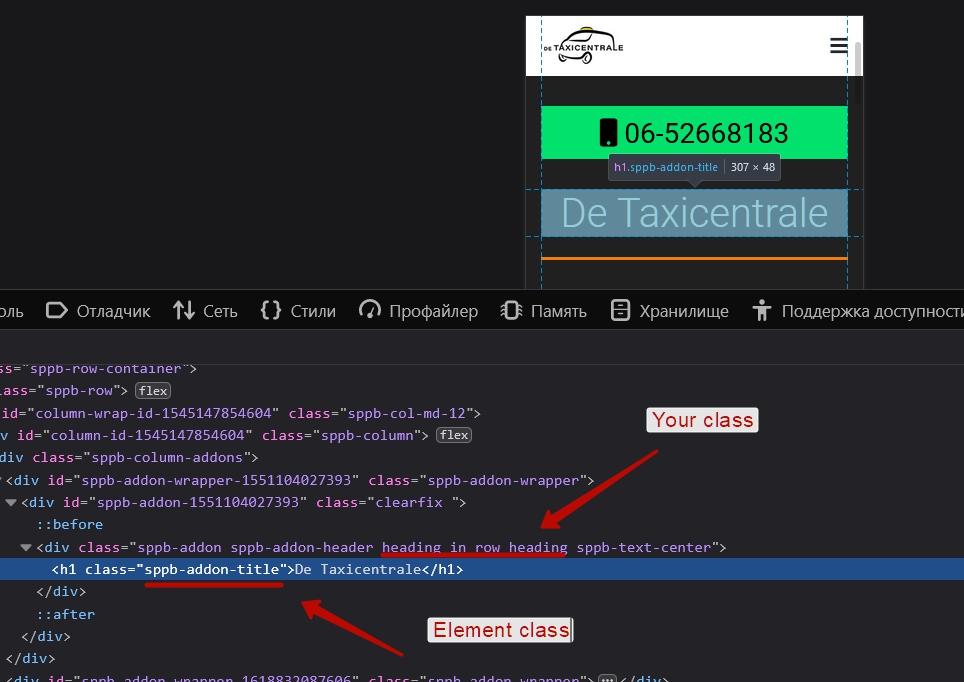
Thus, the composite selector to appeal to the desired element will look like

.heading_in_row_heading .sppb-addon-title

And the code will be like this:

.heading_in_row_heading .sppb-addon-title {
    font-size: 72px;
    color: #fff;
}

You may need to add !important after the value of the property to override what is configured by the addon tools.

.heading_in_row_heading .sppb-addon-title {
    font-size: 72px !important;
    color: #fff !important;
}

If you want to apply a separate code for a specific width of the screen, use the media queries.

@media (max-width: 767px) {
    .heading_in_row_heading .sppb-addon-title {
        color: red;
    }
}

Now on screens less than 768px color text will be red.

Good CSS Tutorials here https://www.w3schools.com/css/default.asp

Edze de Boer Asked this

Hi Pavel,

Thank you for your time to investigate and for your clear explanation!
I will change the custom.css accordingly.

Kind regards,
Edze de Boer

Log in to reply.

