
Not change color preset - Forum | JoomShaper
Staff replied Helix Framework

Not change color preset

Asked by Kamca Energy 2 years ago Last activity 2 years ago

Hello,

I'm working with Helix 2.1.1, and it doesn't allow me to change any default color. I've already cleared the browser cache, Joomla, I've tried making it custom, I've tried everything, I even uninstalled ad blocker and I still haven't been able to change the default yellow color. Thanks for the help.

2 replies

Mehtaz Afsana Borsha Staff

Hi

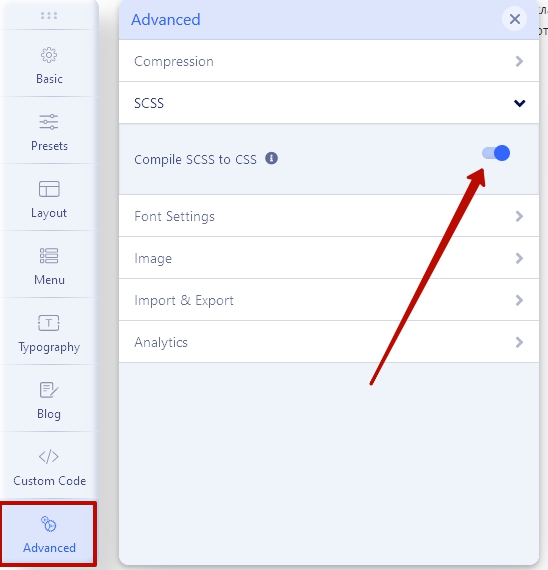
Thanks for contacting us and sorry for your issue. Check template options > Advanced Tab > Compile SCSS to CSS should be ON. Change the colors or just save the template settings to compile new CSS from existing settings, clean the cache and turn OFF this option again if you no longer need to change the colors, for better performance.

https://dl3.joxi.net/drive/2022/02/17/0008/0401/545169/69/96654c2648.jpg

Clear Joomla and Browser cache(Most important)

Hope this helps!

Best Regards

Kamca Energy Asked this

Hello,
Thank you very much for answering my message, unfortunately it still doesn't work for me. I followed step by step what you told me but the color only changes in the loading circles and if I put a logo in text and not an image, but otherwise the color of the template remains yellow. I cleared the Joomla cache, the browser, tried on a new computer and still can't change to a default color. I would appreciate help to make these changes. Thank you very much.

https://kamcaenergy.com/ErrorKamca1.jpg
https://kamcaenergy.com/ErrorKamca2.png

Mehtaz Afsana Borsha Staff

Ok I can solve it via CSS. Could you please give me a screenshot of it? I mean which portion color exactly you want to change?

Kamca Energy Asked this

Hello,
Thanks again for your reply. The idea is to change all the yellow color on the site to this color c60000 which is a corporate red. Thank you very much for your help.

Mehtaz Afsana Borsha Staff

Hi

Use this CSS in your custom.css file


a, .sp-megamenu-parent .sp-dropdown li.sp-menu-item>a:hover, .sp-megamenu-parent .sp-dropdown li.active>a, .offcanvas-menu .menu-parent-open a, .sppb-animated-number-title, .tp-caption a.btn-white, .sp-transparent .header-sticky .sp-megamenu-parent>li a, .sp-transparent .header-sticky .sp-megamenu-parent>li:hover>a, .sp-transparent .header-sticky #sp-menu ul.social-icons a, .sp-transparent .header-sticky .search-trigger:not([href]):not([tabindex]), .sp-transparent .header-sticky .search-trigger:not([href]):not([tabindex]):hover{
    color: #c60000 !important;
}
Bayard

I am having same issue. I go into the template settings and change the Pre Set Colors and they seem to mislabled and don't work well. I am trying to change the background color on the main menu and when i change it in the template settings and save it it doesn't show up. I've cleared cache and tried other browsers.

Using Helix 2.1.1 and the LuxeVista Template

Log in to reply.