Error: Undefined on custom css - Forum | JoomShaper
Solved Helix Framework

Error: Undefined on custom css

Asked by Dina Abramson 2 years ago Last activity 1 year ago

hi,

I am trying to add custom css to change the easyblog post title and when I enter the css and click Save, I get Error: undefined. and the page does not save, keeps spinning in Drafting.

https://rnmaccounting.ca/images/css_error.png

We recently upgraded to Joomla 5.

Any help would be appreciated.

Accepted answer

Marked as the solution
Pavel
1 year ago · edited

I am unable to save the custom css file.

Hi.

I do not think that this problem is related to Joomshaper products.

Check the rights and owner of the files and folders on your hosting. Check the prohibitions in the .htaccess file. When Admin Tools is OFF the .htaccess does not change, but remains like you set it up.

Via hosting panel rename .htaccess to .htaccess-old and htaccess.txt (Joomla default file) to.htaccess.

Most likely you didn’t set all it right when you used Admin Tools. This is a common problem when using Admin Tools if you have no experience and understanding how it works.

I would advise not to use such extensions at all. Since it creates more problems than good. Or thoroughly study Admin Tools in all small aspects of its work.

10 more replies

Rashida Rahman Staff

Hi there!

Thanks for your query.

Please share which css you used, and for which page specifically? Your given link can not be reached from here.

Best Regards

Dina Abramson Asked this
2 years ago · edited

Hi, apologies for the typo in the url. i've corrected it in the hidden content.

this is the css i am trying to add, but it just hangs(Drafting) and when clicking Save, error comes up:
error : undefined comes up.

eb .eb-post-title {

font-size: 20px;
line-height: 26px;
margin: 0 0 10px;
word-break: break-word;
overflow: hidden;
font-weight: 700;

}

Dina Abramson Asked this

hello:

can someone get back to me on this i had a lot of issues last week getting into your site and with using helix template was there a problem rhat is now resolved?

thank tou

Dina Abramson Asked this

Hello:

Can someone please assist? The problem is ongoing.

Dina Abramson Asked this

Hello:

I don't know what is going on, but it has now been 2 weeks since I opened this ticket. Am I going to see some support or not?

Thank you.

Pavel
2 years ago · edited

Hi Dina. I'm not support аgent (just in case).

Try to make such actions:

Turn ON production mode in SPPB settings.
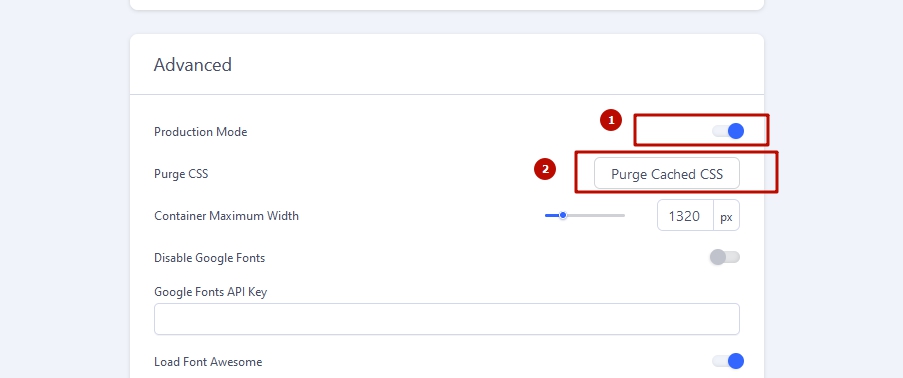
Clean Joomla and browser cache.

To know, read Helix documentation about what to use Custom CSS Field for.

My explanation: Only for cases when you use several template styles and want to make small differences between them. For all other cases, use custom.css file

Create custom.css file following Helix documentation.
Transfer all your code from templates's Custom CSS Field to custom.css file.

Correct errors in your code.

For example
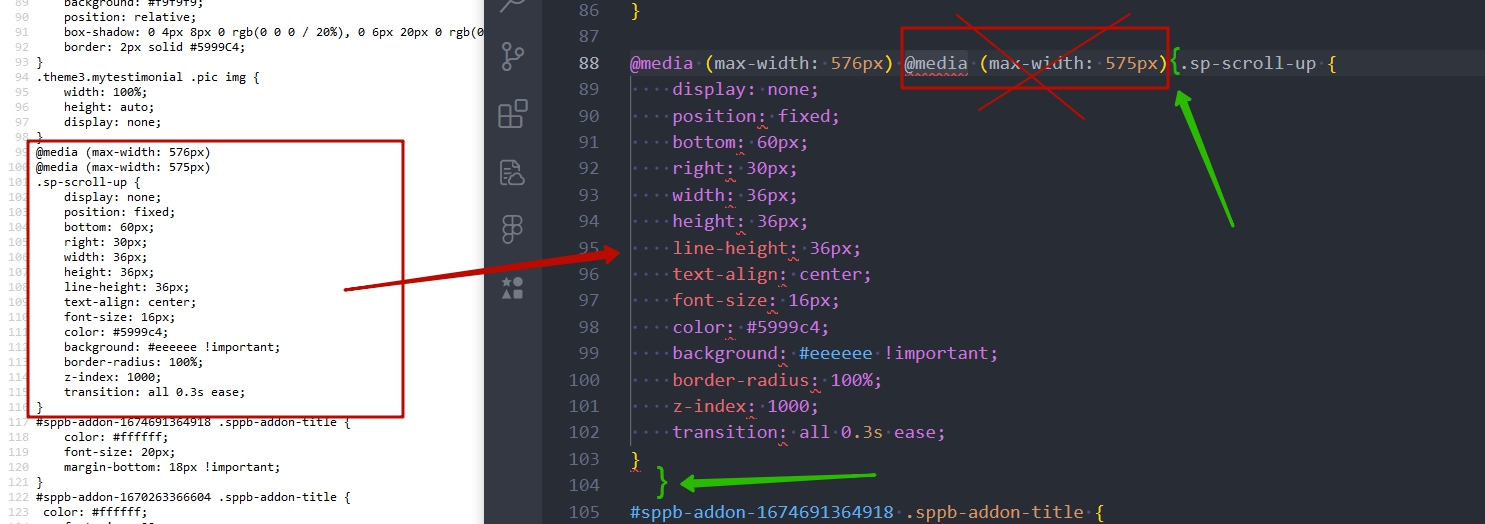
Add your entire further code to the custom.css file

Dina Abramson Asked this

thank you so much Pavel i will give it a shot and see if it helps

Rashida Rahman Staff

Hi Dina Abramson,

Please take my apology.

Unfortunately still I can not visit your given URL, facing the same issue as I reported earlier. However, did you try the suggestion from Pavel, already?

Let us know.

Best Regards

Dina Abramson Asked this

Hi, Unfortunately, Pavel's recommendation did not work because I am unable to save the custom css file. The issue you have been having getting into the url I gave you was due to admin tools which I have disabled until you can look into it.

Please try again.

Dina Abramson Asked this

Hello:

Can someone please look into this?

Thanks.

Log in to reply.
