How do I remove this padding without over riding the CSS? I don't want to have to go into the backend CSS.
sp-main-body {
padding: 100px 0;
Also, how do I get ride of the border?

Thank you!How do I remove this padding without over riding the CSS? I don't want to have to go into the backend CSS.
padding: 100px 0;
Also, how do I get ride of the border?
Thank you!Add also that line:
#sp-left .sp-module ul > li, #sp-right .sp-module ul > li {border-bottom: 0;}
I SAW THAT YOU USED MY PREVIUS CSS already.
Thank you!!
Hi Joe.
Always before posting start from documenation tips: https://www.joomshaper.com/documentation/helix-framework/customization-tips#how-to-reduce-space-between-header-and-article-s-area
The white line that you had was from module style, use that Custom CSS override
#sp-left .sp-module, #sp-right .sp-module {margin-top: 10px; border: 0; }
And before you would ask me where I should put that CSS - read here > https://www.joomshaper.com/documentation/helix-framework/custom-code-css-js-meta#documentation-heading-3
Thank you Paul. Both of your suggestions worked!
Now, how do I get rid of the white line between the menu?
:)
Paul, I spoke too soon. The space is back and I don't know how to get rid of it. I've tried what was suggested in the link, but the space it still there.
Can you give me more details on how to fix this please.
Thank you!
Do you mean the line under "1" and "2" and button "View More details"?
If yes, it's from OSProperty component styles, beyond our support!

Share a new screenshot with arrow and URL - it will be more helpful!
Of course, I can help with Helix Ultimate and our extensions ONLY.
Any update Paul?
Thank you
Joe
Here is a link to the site.
As you can see the padding is still there even though I used the custom css.
Thank you.
Joe
Any update please.
If we talk about that area with default padding: #sp-main-body {padding: 100px 0;}
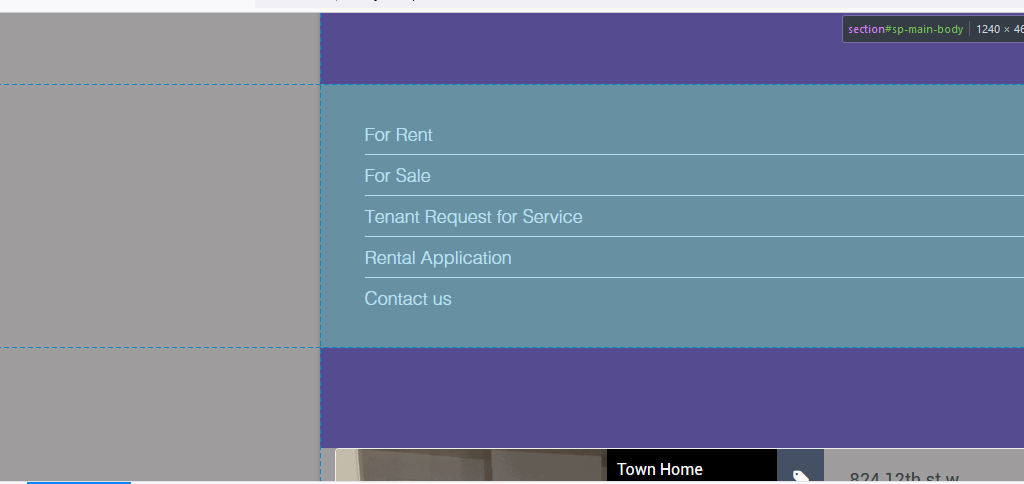
As you already know, you can override it with any value you want, even 'zero' none:
#sp-main-body {padding: 0;}
We informed about that in Helix documenation.
Just use custom.css file or Custom CSS area in Template Options > Custom Code.
I did that and it didn't work but for some reason now it does. Thank you! The only other question is how do I get rid of the white lines in the menus??
Thanks Paul.
