Hi,
I have put info in bottom positions in template and assigned to all pages.
But when I change to other pages in menu it doesnt show.
Same with the topline headinfo like phone#, email etc.
Hi,
I have put info in bottom positions in template and assigned to all pages.
But when I change to other pages in menu it doesnt show.
Same with the topline headinfo like phone#, email etc.
Actually I see now it seems to be changing default template that I use in first page.
Peter, You have to use the same Template Style for all subpages (menu items).
Just remove those templates which you don't use, less confusion.
Have removed but footers assigned to helixultimate-bottom1 etc is still just showing on 1st page.
Toprow works now.
Template assigned to all pages as fas as I can figure out.
Can you please advise. Superstuck :(
Please make screenshot, upload on your server and share link here.
As you know : 1 Image = 100 words.
Probabaly you are Joomla beginner, right?
Module used on bottom, must be assigned to all menu items (!) Otherwise it will display only on selected ones. Assign module to "On all pages" in module settings.
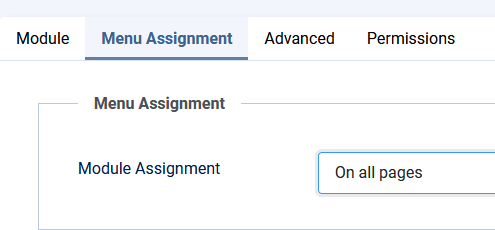
As you know, we cannot teach Joomla basic or CSS tricks here. Also, try to make the questions strictly related to our products, not how to use Joomla features/settings. No offence
Actually not. Have a live site with Joomla 3 and Astroid packade but finally decided to move on to Joomla 4 and read good stuff about Helix etc.
But I am definately a little rusty been spending too little time last year.
made a custom module assinged to bottom1
Menu assignment "On all pages"
Totally wrong?
Sorry missed you image. Have module assignment "On all pages" like you say.
Made new custom modules and assigned to all pages and now it works.
Same as before but worked.
Thanks!
You're welcome. Sometimes usefull screenshot do the job.
