Cart sppagebuilder or easystore- modifications little menu and co - Forum | JoomShaper
Solved EasyStore

Cart sppagebuilder or easystore- modifications little menu and co

Asked by Deleted user 1 year ago Last activity 1 year ago

Hello,

It seems i cant find where to modify or change enything for the cart, (font, size, the little menu that is in english), plese see pictures.
Ive looked in the modules, plugins, helix, im missing something. Can you help me find where to modify all that, please ? I would greatly appriciate it,

thanks

José

Accepted answer

Marked as the solution
Deleted user Asked this

Hio
No ive changed for an other platfom and other solution.s

Thansk again

Mehtaz Afsana Borsha Staff

Thanks for accepting the answer.

12 more replies

Deleted user Asked this
1 year ago · edited

hello thank you, the problem is this page does not display the cart addon.... so i cant see nor change anything...

Deleted user Asked this
1 year ago · edited

Cart Module Customization (button size + language + position)

Hi EasyStore team 🌿

Maybe with some more details.

I’m currently finalizing my site and I’m facing a few issues customizing the cart module.

The buttons at the bottom of the cart ("Clear Cart", "Visit Cart", "Checkout") appear very small in text size compared to the rest of the site, and don’t match my visual identity.
→ Is there a simple way (via CSS or settings) to increase the font size or even apply a custom font to these buttons?

I also noticed that one of the buttons is still in English ("Clear Cart") while the rest is in French.
→ I already checked Settings > Languages > French, but I couldn’t find how to edit this button label. Is there a way to localize it?

Finally, is there a way to fully customize the cart’s style (fonts, button colors, spacing…) so it aligns better with the rest of the site?

Thanks a lot for your help 🙏
And congrats on the EasyStore interface — it’s smooth and really pleasant to work with!

—
José

https://ibb.co/m55tLMS3 here you can also see the"HOMIFY" title on the left top of the page, i need to change that. evrything is easy but not your CART !

Deleted user Asked this

Hello

Thank you for the link, but I’m afraid we’re still not quite on the same page – the documentation you shared only covers the “Add to Cart” button on product pages, whereas my questions all concern the Cart Module itself. It feels like we’re doing a little dance around the real issue, so let me try again:

Font size & family
The “Clear Cart,” “Visit Cart” and “Checkout” buttons feel tiny next to my site’s typography. How can I boost their font size or swap in a custom font via CSS or module settings?

Incomplete translation
Everything else is in French, yet “Clear Cart” stays in English. I’ve checked Settings > Languages > French without luck. Where can I override just that button label?

Full cart styling
I need to align the cart’s colors, spacing and button placement with my brand. Is there a central stylesheet or advanced settings panel for redefining the module’s appearance?

Header title change
The “HOMIFY” text in the top-left corner needs to be renamed. Which file or setting controls that label?

Logo swap
Lastly, where do I replace the “HOMIFY” logo in the top-left with my own? Is that handled via the template settings or a specific module?

Screenshots for context:

https://ibb.co/m55tLMS3

https://ibb.co/q3Tc2nq5

https://ibb.co/cS06Z6Rx

I appreciate your smooth interface and would love to fine-tune the cart (and logo) to match its elegance. Looking forward to your guidance! 🌿✨

Warm regards,
José

Deleted user Asked this

Hello Paul,

Thank you for your reply.
Yes, I already know how to inspect elements and apply custom CSS manually — that's not the point of my initial questions.

I’m asking because I expect a product like EasyStore (especially integrated into SP Page Builder) to provide at least basic control options for crucial modules like the Cart, without having to hack everything manually with CSS.

🛠️ To recap, I am specifically looking for:

A simple way (even through advanced settings) to change button font size and labels in the Cart module itself — not just "Add to Cart" buttons.

A way to fully translate all cart buttons ("Clear Cart" is still in English despite full French language settings).

How to replace the “HOMIFY” logo and header in the cart view.

How to fine-tune the overall cart appearance (fonts, colors, spacing) through settings, without heavy custom CSS coding every time a simple change is needed.

⚡ As a professional user, I’m looking for clarity and modular control, not just browser-based workarounds.

Could you please let me know if:

These options exist somewhere inside EasyStore or SP Page Builder settings?

If not, will they be included in future updates?

Or should I consider adding a third-party eCommerce solution (like Hikashop or J2Store) to have full flexibility?

Thanks in advance for your understanding.
Best regards,
José

Paul Frankowski Senior Staff
1 year ago · edited

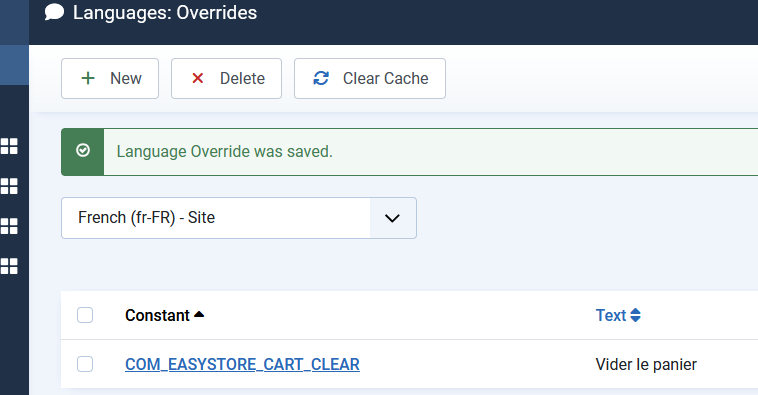
I translated here

info_2786_2025.jpg

Deleted user Asked this

Hi Paul,

Thank you for translating the label — it’s appreciated.
However, my original question was not just about that one string.

I’m also trying to modify the cart module layout, including:

Button font size and family (so it matches the rest of the site),

Overall CSS styling of the cart (colors, spacing, typography),

And the logo/title “Homify” on top — I still haven’t found where to change this.

Could you please point me to the correct module, file or setting for each of these?
Your help is appreciated — I’d love to have a cart that fits the visual identity of boo-j.

Thanks again,
José

Paul Frankowski Senior Staff

Homfy logo on Shoppin cart - removed, clear browser cache to see changes

info_2787_2025.jpg

Custom CSS was needed for that :/

Log in to reply.