Hi, I added a short YouTube video to my Joomla site with SP Page Builder. Is there a way to hide the YouTube account name and make the video autoplay? Thanks.
Solved
SP Page Builder
youtube video hide account name and autoplay
Accepted answer
Marked as the solution
Paul Frankowski Senior Staff
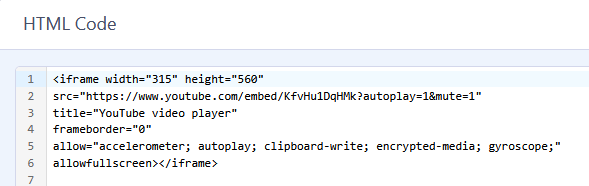
here is example code that I used to force autoplay muted video (YT short)
Massimiliano Asked this
thanks for the help, I inserted the following code:
<iframe width="315" height="560"
src="https://youtube.com/embed/jB8oDBiZ2y4?autoplay=1&mute=0"
title="YouTube video player"
frameborder="0"
allow="accelerometer; autoplay; clipboard-write; encrypted-media; gyroscope;"
allowfullscreen></iframe>
but autoplay doesn't start
3 more replies

Mehtaz Afsana Borsha Staff
1 year ago
· edited
Hi
Thanks for contacting us. Sorry there is no default option to do that, you have to customize it. For autoplay you can follow this forum post below:
https://www.joomshaper.com/forum/question/32183
-Regards.
Massimiliano Asked this
yes, thank you
Paul Frankowski Senior Staff
1 year ago
· edited
As I know is not possible to hide Account Name.
About 2nd, if there is no option for that in used by you addon, it means that code customization is needed.
As guide says: "Chromium browsers do not allow autoplay in most cases. However, muted autoplay is always allowed."
Alternative way, get embed code and use it in Raw Html addon, then you have more control about custom options. Read below guides:
Massimiliano Asked this
thank you.
Is it possible to insert a short youtube video as a background like you do with standard youtube videos?
Paul Frankowski Senior Staff
As I think No, also becuase is too narrow.
Log in to reply.