Hi I just did the update and have received a 500 error
The site is running on Joomla5 and using PHP 8.3
My whole website is now down please can you help?
Many thanks
Solved
Helix Framework
500 Error on updating Helix
Accepted answer
Marked as the solution
Paul Frankowski Senior Staff
11 months ago
· edited
As you can see Component JCH Optimize caused the problem. I also noticed that even a new v9.2 it has problems with PHP 8.4.
Please contact with extension support. And by now disable it using PHPMyAdmin, or by tip at the bottom.
6 more replies
Paul Frankowski Senior Staff
11 months ago
· edited
Hi Chris,
To enable Debug mode in Joomla - as always - please do that:
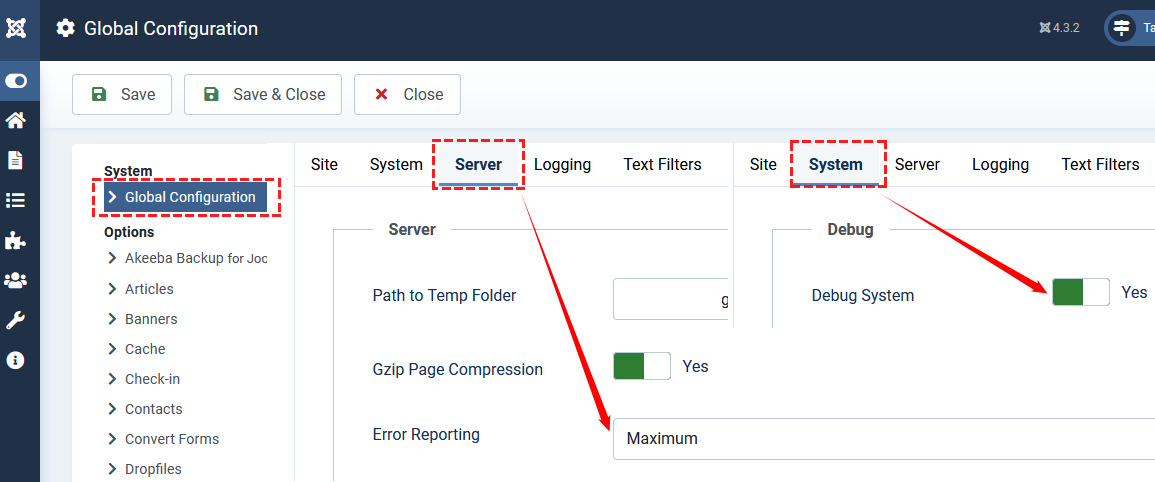
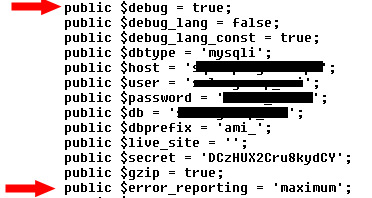
You can do that also by configuration.php file edition
Christopher Lewis Asked this
Hi I can't access the admin I get the same 500 error so I have changed the config file to the above manually.
This the debug message:
Fatal error: Declaration of _JchOptimizeVendor\GuzzleHttp\Psr7\Uri::getScheme() must be compatible with Psr\Http\Message\UriInterface::getScheme(): string in /home/yxigzgeo/public_html/administrator/components/com_jchoptimize/lib/vendor/guzzlehttp/psr7/src/Uri.php on line 332
FatalError
HTTP 500 Whoops, looks like something went wrong.
Compile Error: Declaration of _JchOptimizeVendor\GuzzleHttp\Psr7\Uri::getScheme() must be compatible with Psr\Http\Message\UriInterface::getScheme(): string
Symfony\Component\ErrorHandler\Error\ FatalError
Show exception properties
Symfony\Component\ErrorHandler\Error\FatalError {#999 ▼
-error: array:4 [▶]
}
in /home/yxigzgeo/public_html/administrator/components/com_jchoptimize/lib/vendor/guzzlehttp/psr7/src/Uri.php (line 332)
        $uri->validateState();
        return $uri;
    }
    public function getScheme()
    {
        return $this->scheme;
    }
    public function getAuthority()
Hope this helps.
Thanks
Francis Comtois
same problem here! how to fix without phpmyadmin?
Christopher Lewis Asked this
Hi have used PHP Admin and disabled the jch optimize component and plugin and all is now working. Thanks for the help.
Regards Chris
Paul Frankowski Senior Staff
11 months ago
· edited
If you Joomla Admin don't work anymore (and you're in the panic mode, with no DB skills) - rename those folders:
- administrator/components/com_jchoptimize
- plugins/system/jchoptimize
- plugins/system/jchpagecache
It will allows you to disable all elements from JCH Optimize using Extension Manager.
Notice! I am not a JCH Optimize developer. It's just a friendly tip, not a support answer.
Paul Frankowski Senior Staff
About problem with PHP 8.1 or PHP 8.0 - tomorrow we will share legacy patch.
Log in to reply.