How to hide all mens on single page website - Forum | JoomShaper
Solved Templates

How to hide all mens on single page website

Asked by H 10 months ago Last activity 10 months ago

Hello,

I am building a single page multilanguage website with Helix Utimate and SP Pagebuilder.

Because it is single page, I do not want to show a menu (or hamburger menu). But in the Template settings, there is no option for showing no menu.

How to do this?

Accepted answer

Marked as the solution
Paul Frankowski Senior Staff
10 months ago · edited

Hoi,

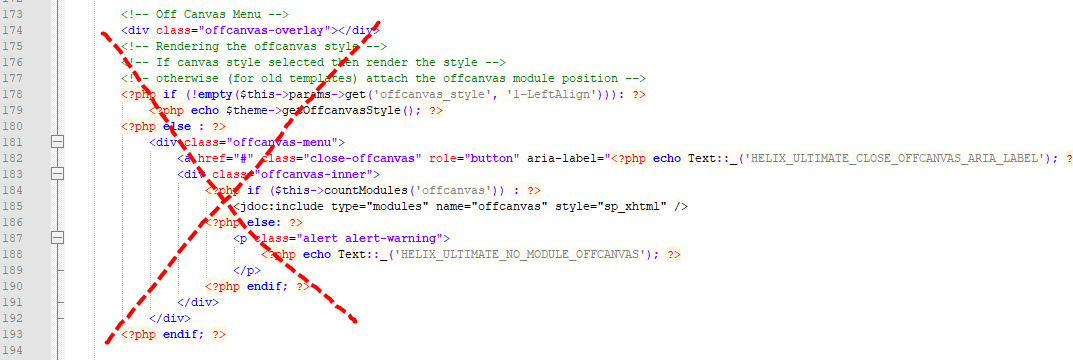
in that case, you have to customize index.php file from template folder, and delete code that activate offcanvas menu, look

info_3573_2025.jpg

H Asked this

Frank,

I modified index.php, but the hamburger menu is still there.

I took care to empty the server and browser caches.

Does it make a difference that I use copies of the Helix template for each of the different languages on my wesite?

3 more replies

Ziaul Kabir Staff

Hello H,

Thanks for reaching out to us.

Please go to System → Site Template Styles → your_template_name → Template Options, and disable the Predefined Header option.

Screenshot: https://prnt.sc/HorLpgjmvPKi

Thanks.

H Asked this

Unfortunately this is not a solution: the header also contains my logo and the language selector because it is a multilanguage website.

Ziaul Kabir Staff

Could you please share temporary administrator access to your Joomla backend? You can provide the credentials securely in the hidden content section. Also, please take a full backup of your site before we make any changes.

Once I have access, I’ll investigate further and see what’s causing the issue. Let me know once you’ve shared the details!

Best regards,

H Asked this

I have already made the menus disappear ("hidden") with css in custom.css.

But the hidden hamburgermenu leads to some negative points in Google Lighthouse. So I want to completely remove the hamburger menu.

Credentials are attached

Log in to reply.