Good morning, I'd like to reduce the space between the header and the article area. I tried following the guide. I created the "custom.css" file, but even adding the suggested code ".com-content #sp-main-body {padding-top: 0px; }" didn't change anything. What am I doing wrong?
Thanks for your help.
Solved
SP Page Builder
Reduce space between Header and Article(s) area
Accepted answer
Marked as the solution
Ziaul Kabir Staff
It’s great to hear that your issue has been resolved.
If everything is working fine now, please mark the question as complete by accepting any of our answers.
Thank you!
5 more replies
Ziaul Kabir Staff
Hello,
Thanks for reaching out to us.
Please, try this:
.com-content #sp-main-body {padding-top: 0px !important; } If you think issues still persists, please share your website url with me.
Thanks
Salvatore Asked this
Good morning,
this doesn't work either.
Here's the link to the site currently under construction:
https://www.pcfactory.it/Test/Meligrana_2026/
Thank you for your support.
Ziaul Kabir Staff
This is https://prnt.sc/-2sXy6IWTZcK your section padding, remove from your section padding-top or use this css:
.sp-page-builder .page-content #section-id-bd9afe2c-ffc6-4f4a-8d6e-4db59dff1a96 {
    padding-top: 0;
    }
Thanks
Salvatore Asked this
7 months ago
· edited
Good morning,
I added the code to the "custom.css" file, but nothing changed. How do I remove section padding-top?
Thanks.

Paul Frankowski Senior Staff
7 months ago
· edited
Ciao.
- share link to that subpage, it will help us to check Class Name details.
- If you talk about /Test/Meligrana_2026/ - this is not a Article (Joomla), but Page (SPPB).
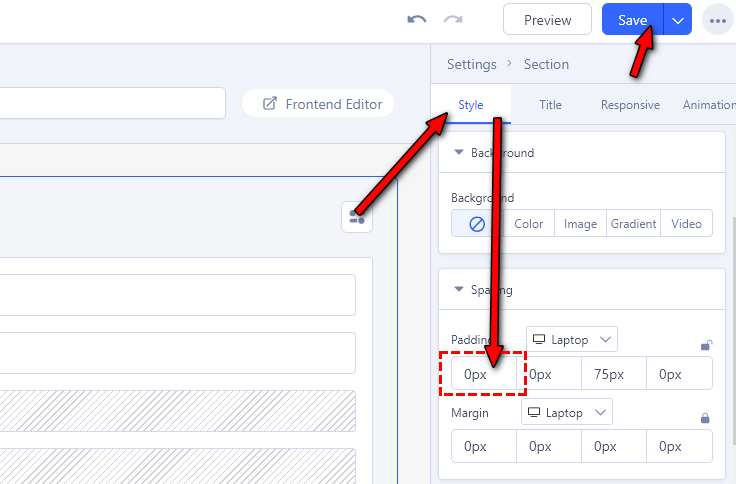
And you have to go SP Page Builder editor, edit that page, edit 1st section, and in settings change top padding from 75px to 0.
Paul Frankowski Senior Staff
Screenshot (now should be visible where to click)
Salvatore Asked this
Good morning,
OK, thanks to you, I solved it.
Thanks.
Paul Frankowski Senior Staff
Good to know.
Please mark topic as solved :)
Log in to reply.