

Reduce Space Between Header And Article(s) Area
S
Salvatore
Good morning, I'd like to reduce the space between the header and the article area. I tried following the guide. I created the "custom.css" file, but even adding the suggested code ".com-content #sp-main-body {padding-top: 0px; }" didn't change anything. What am I doing wrong? Thanks for your help.
9 Answers
Order by
Oldest

Ziaul Kabir
Accepted AnswerHello,
Thanks for reaching out to us.
Please, try this:
.com-content #sp-main-body {padding-top: 0px !important; } If you think issues still persists, please share your website url with me.
Thanks
S
Salvatore
Accepted AnswerGood morning, this doesn't work either. Here's the link to the site currently under construction:
https://www.pcfactory.it/Test/Meligrana_2026/
Thank you for your support.
Ziaul Kabir
Accepted AnswerThis is https://prnt.sc/-2sXy6IWTZcK your section padding, remove from your section padding-top or use this css:
.sp-page-builder .page-content #section-id-bd9afe2c-ffc6-4f4a-8d6e-4db59dff1a96 {
    padding-top: 0;
    }
Thanks
S
Salvatore
Accepted AnswerGood morning, I added the code to the "custom.css" file, but nothing changed. How do I remove section padding-top?
Thanks.

Paul Frankowski
Accepted AnswerCiao.
- share link to that subpage, it will help us to check Class Name details.
- If you talk about /Test/Meligrana_2026/ - this is not a Article (Joomla), but Page (SPPB).
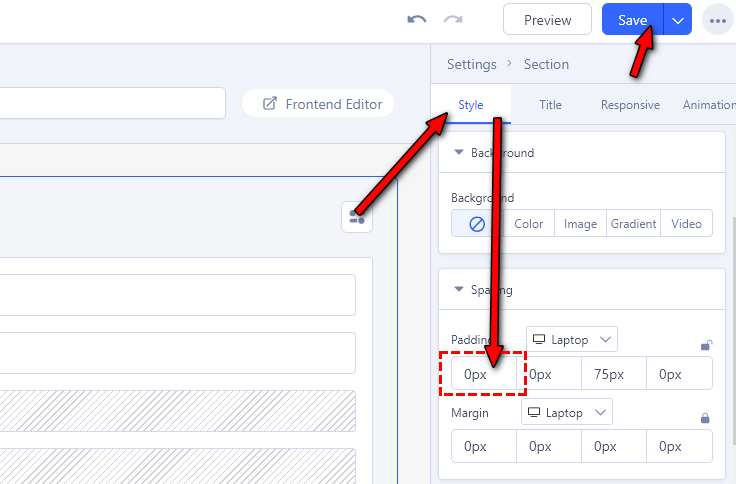
And you have to go SP Page Builder editor, edit that page, edit 1st section, and in settings change top padding from 75px to 0.
Paul Frankowski
Accepted AnswerScreenshot (now should be visible where to click)
Ziaul Kabir
Accepted AnswerIt’s great to hear that your issue has been resolved. If everything is working fine now, please mark the question as complete by accepting any of our answers.
Thank you!