access to library area - Forum | JoomShaper
Solved SP Page Builder

access to library area

Asked by Jürgen 7 months ago Last activity 7 months ago

Hello,
I have this contract:

Personal
Access to Templates & Extensions
for three accounts.

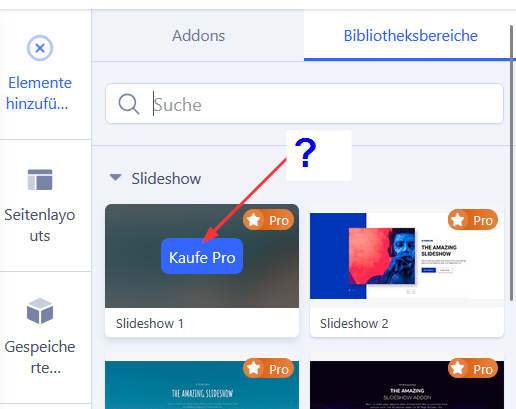
I am in the administration section of an SP Page Builder page. Under Add Elements, there are two buttons: Add-ons and Library Areas. Now I click on Library Areas and select Slideshow, for example. A selection appears there. But every option is marked with “Purchase Pro.”

I think I had access to this a few years ago. The contract has never changed.

On your website:
https://www.joomshaper.com/pricing?plan=templates
under “Personal” it says:
SP Page Builder Pro

Why don't I have access?

Best regards, Jürgen
Accepted answer

Marked as the solution
Atick Eashrak Shuvo Staff

We apologize for any inconvenience this may have caused. Please ensure that you have correctly entered your license information in your SP Page Builder settings and registered your domain in your Joomshaper dashboard. If you have completed these steps and are still encountering the issue, we kindly ask you to refer to this documentation for further assistance:
https://www.joomshaper.com/documentation/sp-page-builder/troubleshooting#i-have-the-pro-version-but-with-locked-pro-features

1 more reply

Jürgen Asked this

I still had to enter the license key.
Now it works.
Thank you very much and best regards.

Log in to reply.
