mega menu li.active menu item - Forum | JoomShaper
Solved Helix Framework

mega menu li.active menu item

Asked by Karen Dunne 6 months ago Last activity 6 months ago

The About menu item on this site: https://mavendesignstudio-demo.com/moa/about
uses the Helix mega menu.

The active page, e.g. awards, is meant to have the same styling as the rest of the menu. The CSS I used for the regular menu is this:

.sp-megamenu-parent > li.active > a {
font-weight: 700;
color: var(--bs-primary) !important;
text-underline-position: under;
text-decoration: underline;
}

I would like the same styling within the mega menu. I found some settings in Helix for the mega menu but nothing that helps with the active item. And the other CSS I tried for the mega menu only works on all the items instead of the active page.

Please see this screenshot: https://go.screenpal.com/watch/cOel3knZp0R

Accepted answer

Marked as the solution
Paul Frankowski Senior Staff

Let's try that instead ... (for submenu items)

.sp-module ul.menu > li.current > a {
  color: red; font-weight: 700; 
}

10 more replies

Karen Dunne Asked this
6 months ago · edited

Hi Ziaul,

Your screenshot shows the Awards link (/awards) with the active styling, but the browser URL is on the About page (/about).

Paul Frankowski Senior Staff
6 months ago · edited

Hi Karen,

use that class name, it will work

ul.mod-menu li.current a {
  text-decoration: underline; font-weight: 700; 
}

code updated

Karen Dunne Asked this

Thanks, Paul. I think that's one of the combinations I tried that before but it only works on the /about URL. The CSS is still there so you can see what I mean.

Paul Frankowski Senior Staff
6 months ago · edited

Please add my code by now, so I will be able to check if it works also inside "Insights" if we talk about submenus.


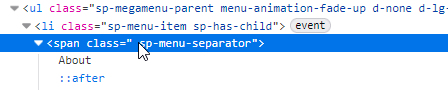
Regarding the Main Menu items (About & Insights): it looks like you are using a "menu-separator" instead of a link.

Because of this, Joomla does not treat it as a "real" menu item, meaning it cannot hold an active status or be highlighted. This isn’t a bug with the Helix template or Joomla itself; it has actually functioned this way since Joomla 1.0 (2005).

In short: a Separator in a Joomla menu works just like a <hr> (horizontal rule) "divider" in HTML. It is meant for visual spacing, not for navigation. Yes, sometimes webmaster use it as typical Menu item, but ... it has its limitations/drawbacks.

info_4097_2026.jpg

Karen Dunne Asked this

Yes, your code is there. And with Insights, another Mega Menu, it works only on the first one, i.e. thought leadership, but not News.

Karen Dunne Asked this

I just changed the Insights menu item from Separator to Menu Heading, and it appears to behave the same way.

https://go.screenpal.com/watch/cOeI24nZ57f

With a mega menu, I don't want the item in the main menu to link to anything. Is there a way to do this still with CSS?

Paul Frankowski Senior Staff

Quick question, 2nd CSS works or not?

Karen Dunne Asked this

Brillant. That worked. I was close to getting this but I kept using the :active pseudo-class. Thank you! 🙏

Log in to reply.