

Mega Menu Li.active Menu Item

Karen Dunne
The About menu item on this site: https://mavendesignstudio-demo.com/moa/about uses the Helix mega menu.
The active page, e.g. awards, is meant to have the same styling as the rest of the menu. The CSS I used for the regular menu is this:
.sp-megamenu-parent > li.active > a { font-weight: 700; color: var(--bs-primary) !important; text-underline-position: under; text-decoration: underline; }
I would like the same styling within the mega menu. I found some settings in Helix for the mega menu but nothing that helps with the active item. And the other CSS I tried for the mega menu only works on all the items instead of the active page.
Please see this screenshot: https://go.screenpal.com/watch/cOel3knZp0R
11 Answers
Order by
Oldest

Paul Frankowski
Accepted AnswerLet's try that instead ... (for submenu items)
.sp-module ul.menu > li.current > a {
  color: red; font-weight: 700;
}
Ziaul Kabir
Accepted AnswerHello Karen,
Thanks for reaching out to us.
From my end, I see this https://prnt.sc/_rgLeL-jDCBd
Thanks
Karen Dunne
Accepted AnswerHi Ziaul,
Your screenshot shows the Awards link (/awards) with the active styling, but the browser URL is on the About page (/about).
Paul Frankowski
Accepted AnswerHi Karen,
use that class name, it will work
ul.mod-menu li.current a {
  text-decoration: underline; font-weight: 700;
}
code updated
Karen Dunne
Accepted AnswerThanks, Paul. I think that's one of the combinations I tried that before but it only works on the /about URL. The CSS is still there so you can see what I mean.
Paul Frankowski
Accepted AnswerPlease add my code by now, so I will be able to check if it works also inside "Insights" if we talk about submenus.
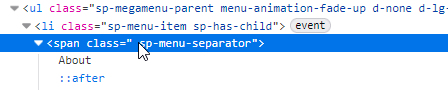
Regarding the Main Menu items (About & Insights): it looks like you are using a "menu-separator" instead of a link.
Because of this, Joomla does not treat it as a "real" menu item, meaning it cannot hold an active status or be highlighted. This isn’t a bug with the Helix template or Joomla itself; it has actually functioned this way since Joomla 1.0 (2005).
In short: a Separator in a Joomla menu works just like a <hr> (horizontal rule) "divider" in HTML. It is meant for visual spacing, not for navigation. Yes, sometimes webmaster use it as typical Menu item, but ... it has its limitations/drawbacks.
Karen Dunne
Accepted AnswerYes, your code is there. And with Insights, another Mega Menu, it works only on the first one, i.e. thought leadership, but not News.
Karen Dunne
Accepted AnswerI just changed the Insights menu item from Separator to Menu Heading, and it appears to behave the same way.
https://go.screenpal.com/watch/cOeI24nZ57f
With a mega menu, I don't want the item in the main menu to link to anything. Is there a way to do this still with CSS?
Karen Dunne
Accepted AnswerI thought it was necessary to use a module to add the menu in the mega menu settings. Within a mega menu settings, there isn't an option to add menu items. Screenshot: https://go.screenpal.com/watch/cOeI2gnZ5sh