How can I display a module (loadmoduleid id) within SPPB using a text add-on or something similar?
I tried adding it, but the string is displayed on the front end.
Best Rgds
Solved
SP Page Builder
loadmoduleid id
Accepted answer
Marked as the solution
Rashida Rahman Staff
You are always welcome:)
You may accept the most useful answer in order to close the post.
Have a nice day!
4 more replies
Rashida Rahman Staff
Hi there!
Thanks for reaching out.
Shortcodes do not work directly inside most SP Page Builder addons, which is why the shortcode is displayed as plain text on the frontend.
One of the recommended solutions is to use the Joomla Module addon in SP Page Builder and load your desired module from there.
You may also check this documentation:
https://www.joomshaper.com/documentation/sp-page-builder/how-to-tips#how-to-use-shortcode-inside-sp-page-builder
Best regards,
Pirosoft Asked this
Thank you for your reply
Rashida Rahman Staff
Thanks for accepting the answer:)

Paul Frankowski Senior Staff
4 months ago
· edited
You can use a Joomla module using the Module addon. This is the easiest way since SPPB 3.x
Inside Text addon you can also use {loadmoduleid 158} where 158 is module ID number, but those two plugins (screenshot) must be enabled/Published in Joomla. Tested, it works in SPPB 6.x & Joomla 6.1.
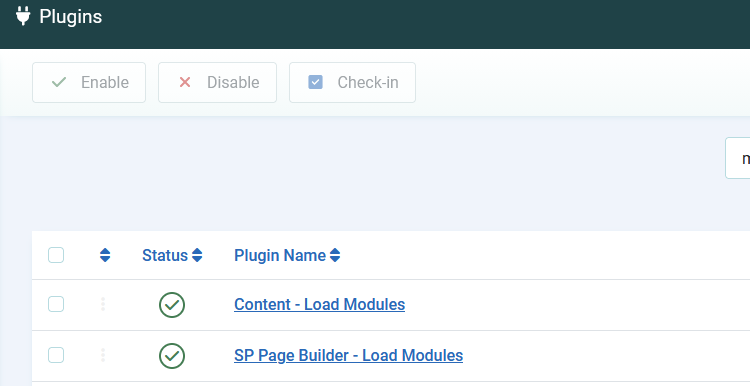
remember to use correct syntax: "{" not "("
Pirosoft Asked this
Thanks for your reply. I'm using SPPB Free.
Paul Frankowski Senior Staff
I can help only with Pro version. Free is mostly for testing purposes, that's why many features, addons and plugins are not there.
My help ends here.
Log in to reply.