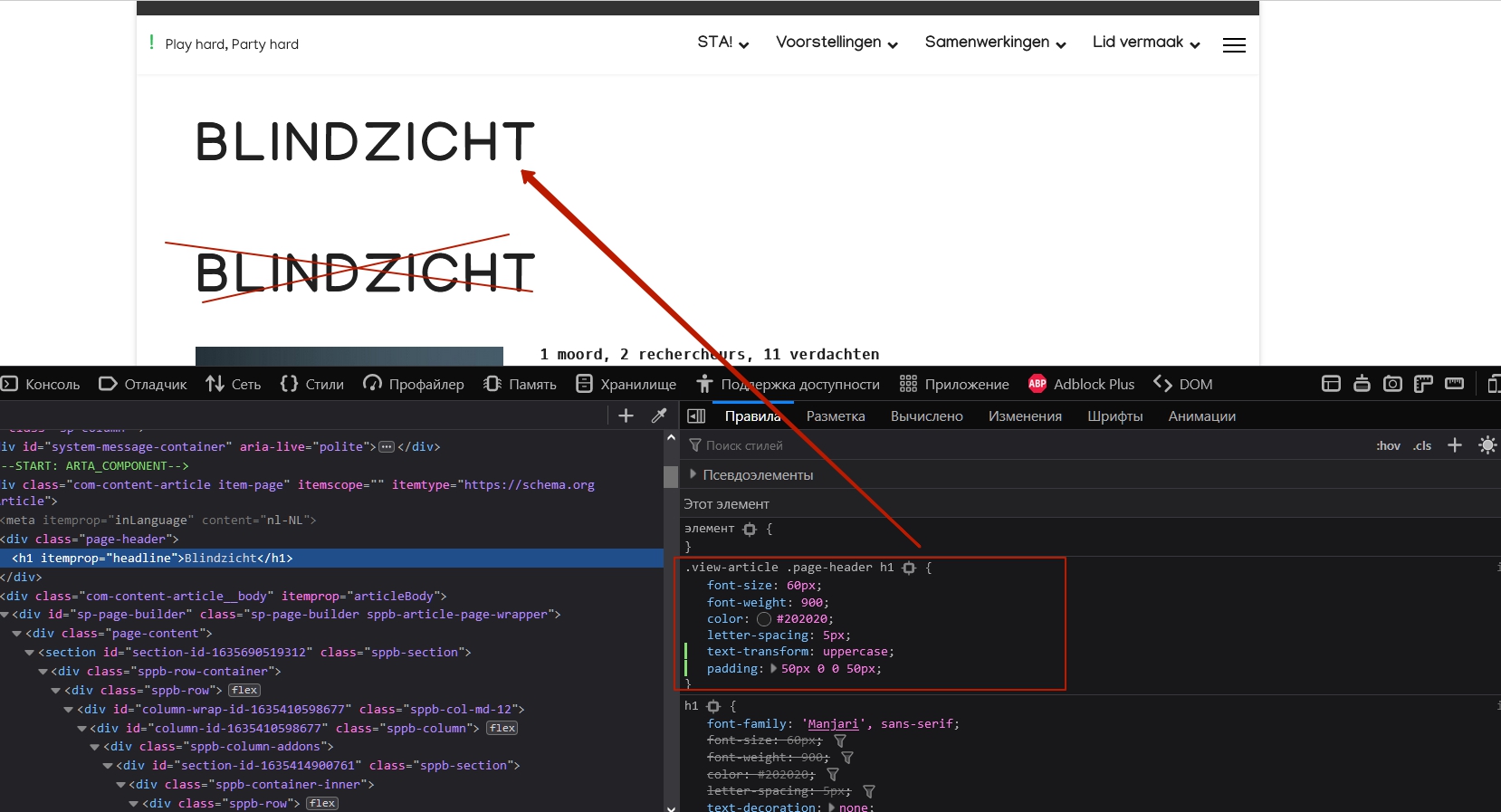
I have a extra title in the class page-header, how do I hide this extra title?
![(https://imgur.com/N6pjp6R)]
Exemple: https://sta.vanloon.net/index.php/voorstellingen/regisseurs-2/remi-walsari/blindzicht
I have a extra title in the class page-header, how do I hide this extra title?
![(https://imgur.com/N6pjp6R)]
Exemple: https://sta.vanloon.net/index.php/voorstellingen/regisseurs-2/remi-walsari/blindzicht
To disable it using the menu item settings, you need to assign an article to the menu item. Now it is not assigned and is inherited from the Category List Menu Item setup. If you disable it there, the headlines will also disappear in the list of articles. And I understand that using the binding of each article to the menu item is a lot of handmade and not convenient.
Therefore, the best solution in this situation is do not attempt to disable the joomla article title, but delete it from SP Page Builder. Moreover, the joomla article title has a micro-data, which is much better for SEO than the title inside Page Builder. If you use it inside the Page Builder only because of the stylization option, simply configure the joomla article title using CSS instead.
.view-article .page-header h1 {
    font-size: 60px;
    font-weight: 900;
    color: #202020;
    letter-spacing: 5px;
    text-transform: uppercase;
    padding: 50px 0 0 50px;
}
Hello Ton van Loon
Please share your administrator access here to check the issue. Use the Hidden Content box to share the credentials.
Best regards
administrator access shared in hidden box.
Is this a hard question or am I being forgotten?
You are not forgotten. Please share this access too.

I don't know what you mean by that login. The site https://sta.vanloon.net is publicly accessable. Can you give me a clue?
I tried to post the .httaccess file of www.vanloon.net in the hidden section, but the save button keeps spinnning when i try to save is. Do you need it?
https://sta.vanloon.net does not have a .httaccess. Does it need to have one?
After giving your credentials, I get this popup. And I cannot log in with your shared credentials here. Maybe you can talk with your hosting provider about this. I am accessing from Bangladesh (country).
Will do
deleted
deleted
I've deleted the extra credentials I gave you before, because they won't work. In this last hidden section you'll find the credentials for the extra login pop-up.
I have a extra title in the class page-header, how do I hide this extra title?
Hi. Turn off it in menu item settings (basic joomla knowege)
I thought it was basic knowledge too. But that's the problem, they are all turned off.
Screen shot of the cascading settings:
What am I overlooking? Please help.
I choose my original solution so I could differ the size of the Title on desktop screen versus mobile screen.
What would be the CSS code for achieving that?
I want my H1 to be 60px on desktop, but 40px on mobile
(I don't differentiate for more types at this point)
The Helix ulimate 2.0.5 framework has no ability to set differentiate the H1 font sizes per device type in the Typografy settings.
The Helix ulimate 2.0.5 framework has no ability to set differentiate the H1 font sizes per device type in the Typografy settings.
It has. Delete font size from my code abowe and use Helix settings. Set font size by switching betwin devices.
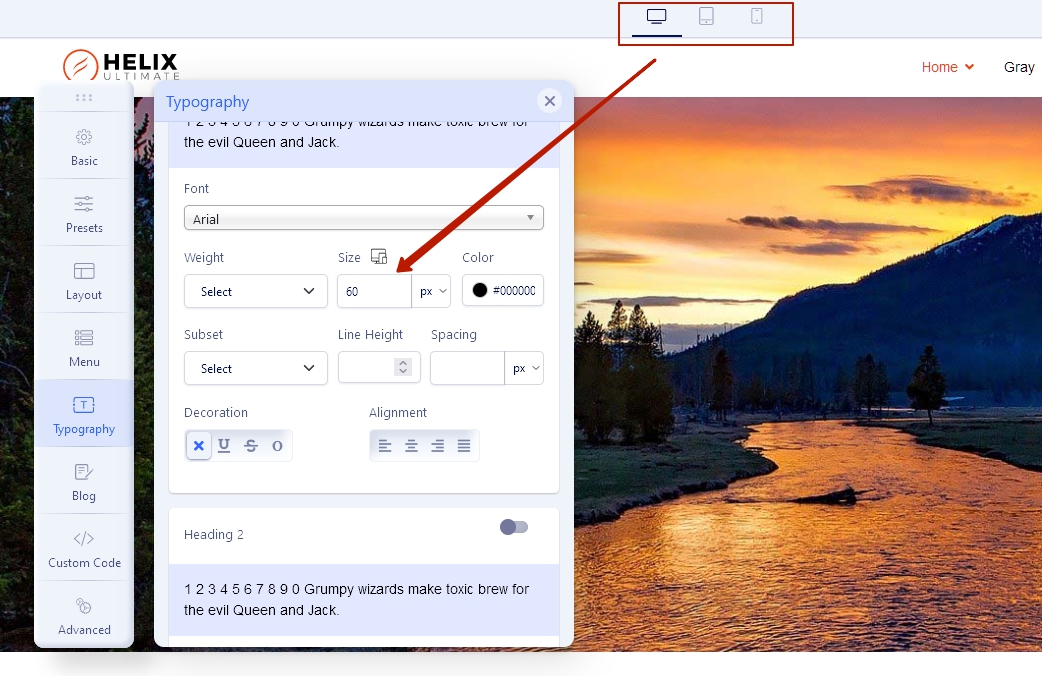
Or here is css
@media (max-width: 1199px) {
    h1 {
        font-size: your value;
    }
}
@media (max-width: 991px) {
    h1 {
        font-size: your value;
    }
}
@media (max-width: 767px) {
    h1 {
        font-size: your value;
    }
}
@media (max-width: 575px) {
    h1 {
        font-size: your value;
    }
}Thank you Pavel for your swift assistance. You're of great help and I learned a lot. I did not find this way Helix handles the font-sizes for different screen sizes, but in hindsight it's rather intuitive. Thanks a lot for pointing it out to me.
You are wellcome

