

Blog Issues In Konstra Template
S
Serg
Navigation arrows previous next became buttons.
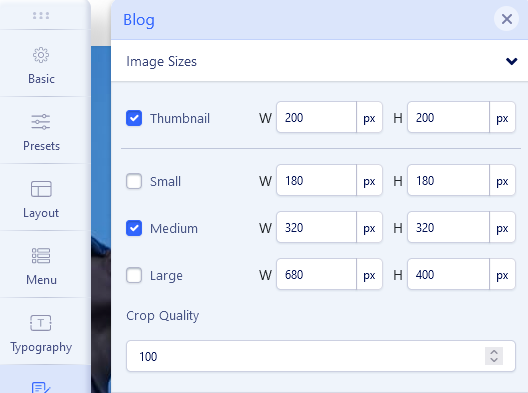
Also, when I upload an image to the blog, the images become larger than the original. https://www.joomshaper.com/images/2021/06/16/helix_blog.png
Website
https://worldcustomwatch.com/
16 Answers
Order by
Oldest

Toufiq
Accepted AnswerHi there,
Thanks for contacting us. Sorry for the inconvenience. Will you please provide me the Joomla administrator access to check the issue? I will check & get back to you soon.
-Thanks
Toufiq
Accepted Answer
S
Serg
Accepted AnswerAt the bottom, the arrow to go to another page in the original template is an arrow, in my template the arrow appears as a button
Toufiq
Accepted AnswerOh, Got it. This issue raised after update the Joomla4. I will fix it next working day. Thanks
S
Serg
Accepted AnswerThank you, everything works, but what have you changed? this is by chance if I need to reinstall the site. And one more question: There is a problem on my site, I make changes and I need to clear the browser to see them. Moreover, the changes are not reflected even if you log in after a few days. Where can you change this? thank you for your responses
Toufiq
Accepted AnswerI have added this css code inside the custom.css file.
ul.pagination{
    display: flex;
    justify-content: space-between;
}
li.next.page-item>a,
li.previous.page-item>a{
    font-size: 27px;
    background: transparent;
    display: flex;
    align-items: center;
    padding: 0;
    border: none;
}
li.next.page-item>a:hover,
li.previous.page-item>a:hover{
    border: none;
}
li.next.page-item>a:after {
    content: "\f061";
    font-family: 'Font Awesome 5 Free';
    font-weight: 900;
    font-size: 44px;
    margin-left: 10px;
}
li.previous.page-item>a:before {
    content: "\f060";
    font-family: 'Font Awesome 5 Free';
    font-weight: 900;
    font-size: 44px;
    margin-right: 10px;
}