

Slider Pro - Background Image - Image Priority

Marek
Hello, For my website I'm using Template: Innovate. At home page I use Slider via Carousel Pro. I set the logo via style as a background image. Is it possible via CSS to pull this PNG logo over Carousel?
Or can it be placed Image via modul on the same position ? Thanks for advice.
9 Answers
Order by
Oldest

Pavel
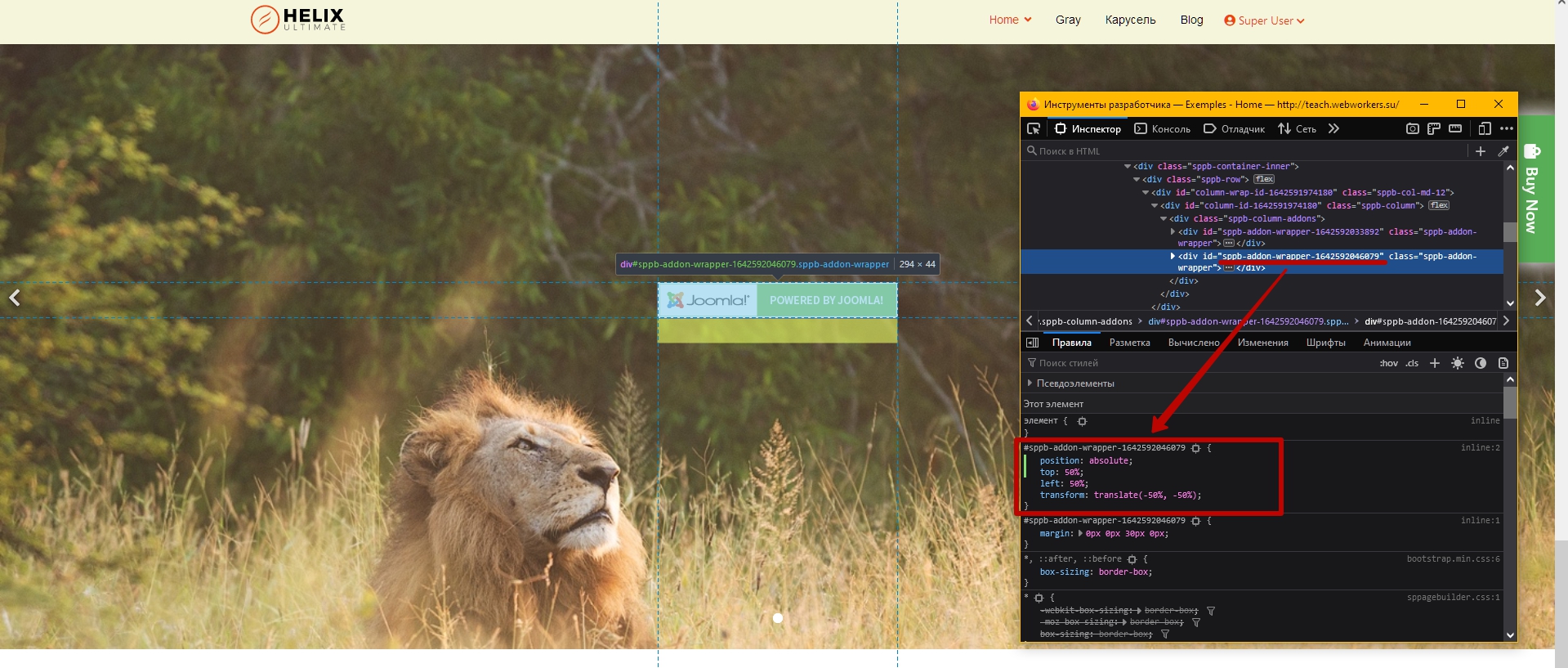
Accepted AnswerHi Marek. Add addon with logo image below carousel addon in the same section and the same column. Use Advanced Tab to place logo addon where you want via absolute position settings.
Or use CSS for this addon, which is flexible. Since Absolute Position Settings lack some properties. For CSS code you should find the addon ID via code inspector. Looks like that #sppb-addon-wrapper-ххххххххххххх
Code example
#sppb-addon-wrapper-ххххххххххххх {
    position: absolute;
    top: 50%;
    left: 50%;
    transform: translate(-50%, -50%);
}

Rashida Rahman
Accepted AnswerHi there!
Thanks for your query.
Would you please explain your wish a little bit more with a screenshot/screencast to visualize it better? I am unable to understand the requirement you want here. Sorry about that.
Best Regards
Marek
Accepted AnswerHi Rashida, I want to achieve the effect as it is in the attached image. I'm trying it for several days but without the result. Will you be able to help me? Thank you
Marek
Accepted AnswerHi Pavol, thank thank thank you very much. It's exactly what I needed. One more question. Is it possible to send a CSS code for the same appearance even for mobile view? The module is under Carusel now.
Pavel
Accepted AnswerHi Marek. It should work in mobile view too. If it does not work, I need to look at your page to find out the cause. I am not an employee of the support, so I can take a look only if you provide a public link.
... Maybe you just need to clean the cache on your device
Marek
Accepted AnswerHi Pavol, I've cleaned cache - it wasn't affecting it.
Dev. webpage: http://joomla41.janicko.com Addon wraper is: 1642597671750
Design row webpage: https://ibb.co/r0rBN6h
Pavel
Accepted AnswerHi. Code works as it should, but in mobile view you hid the carousel relative to which the logo is positioned.
Therefore, you need to add another addon with logo for mobile devices and use the same code for it.

Marek
Accepted AnswerHi Pavel, It works!!!! It was incredibly simple. But for me difficult. Thanks for help.