Using Helix Ultimate default template. How to increase the size of social media icons in header? Is there a setting for this or do I use custom css?
Solved
Helix Framework
Increase size of heading social medis icons.
Accepted answer
Marked as the solution
Rashida Rahman Staff
Hi there!
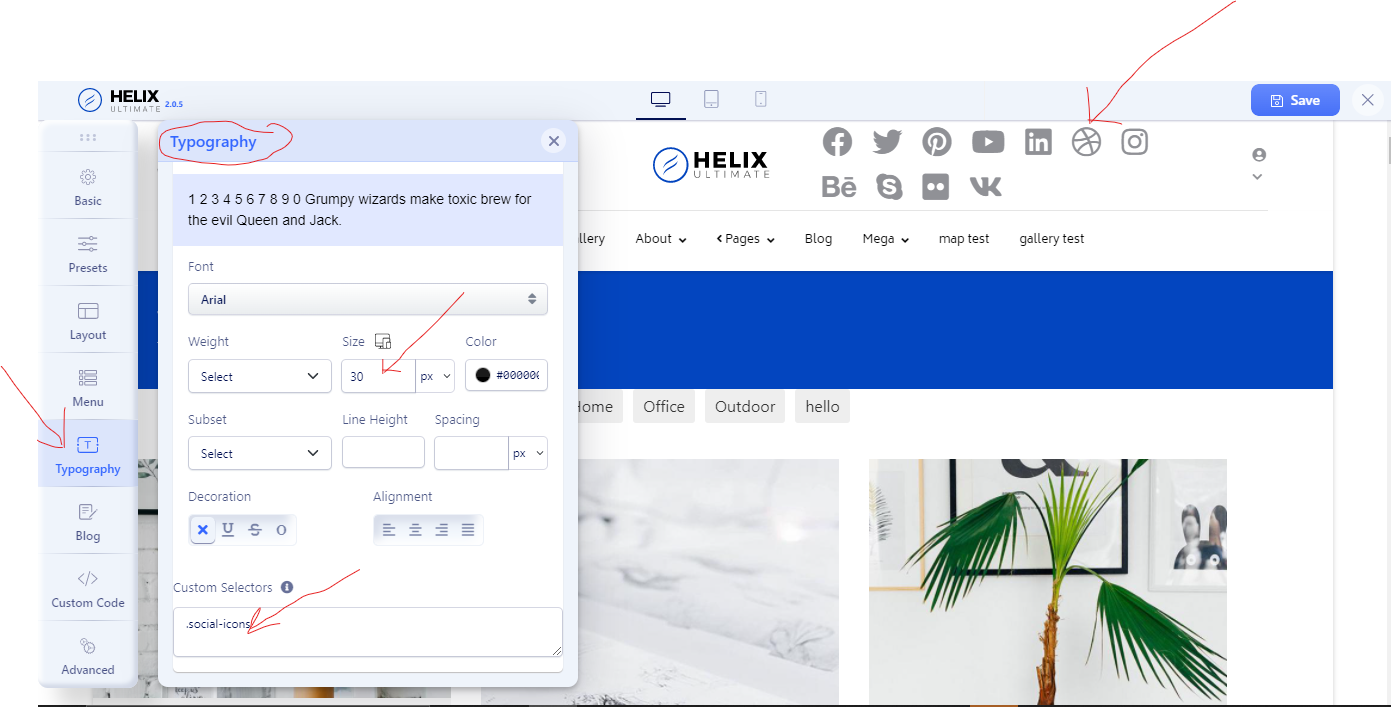
You can use .social-icons as custom selector. Please follow the screenshot below:
Alternative solution-
If you wnat to use custom CSS then here it is:
ul.social-icons>li {
    font-size: 15px;
}
In your case section ID need to be added too. The following blog post may help you to find selectors:
https://www.joomshaper.com/blog/which-line-of-css-i-have-to-edit-code-inspector-in-action
Note: Path towards custom CSS: Extensions>Templates>Styles> Click on your current default template name then choose Template Options. Then find custom CSS within the custom code.
Best Regards
5 more replies
Rashida Rahman Staff
4 years ago
· edited
Hi there!
Thanks for your query.
Yes you need to use custom CSS in this case.
Or,
You can use custom option of the typography tab of your Template Options. You need to put custom selector for your social icons. Here is a screenshot:
Best Regards
Jeffrey Kiefer Asked this
What to put in the custom selectors for just the header social media icons? Is there just a css snippit I can add to custom css instead? I only want to make the header social icons larger.
Rashida Rahman Staff
Thanks for accepting my answer:)
Jeffrey Kiefer Asked this
I just left review on extensions.joomla.org
Name Jeffrey Kiefer
Rashida Rahman Staff
Really thankful for your kind review!
Your appreciation inspires us so much :)
Log in to reply.