

Show Module Above Component
DR
doug raught
I need to show a module above a component (calendar). I tried the "content-top" module position but I discovered it shows the module on ALL pages.
URL of example: https://holyhoster.com/nl/index.php/ec
- Here you see that the menu is barely visable. A module (header) would solve this problem.
- When you click on one of the events images/links, you are taken to another component page which also needs to have a module placed above it.
Is this even possible? Another solution would be to get the menu to appear with the color background. The style of the site is for transparent and I want to keep that. But it may not be possible on the pages with components.
Hopefully there is a solution that doesn't require me to rethink my menu/header design.
Thanks
1 Answers
Order by
Oldest

Rashida Rahman
Accepted AnswerHi there!
Thanks for your query.
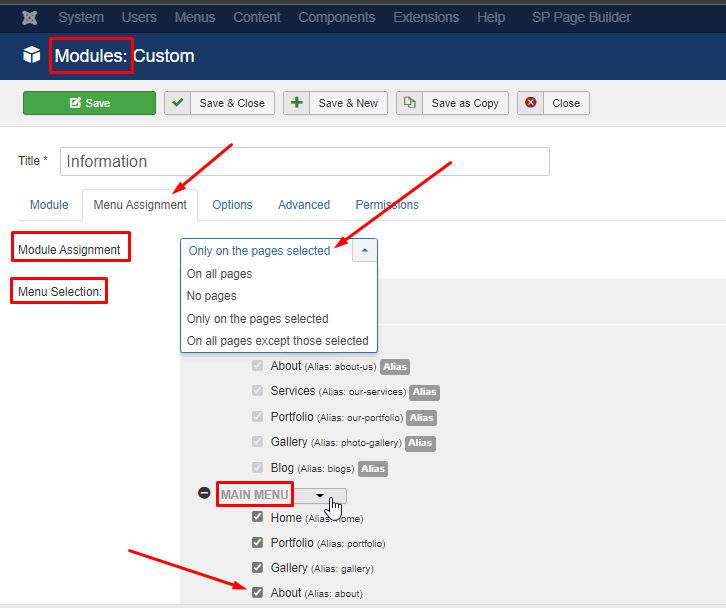
If you want to show a module in a few selected pages/menus only then you can select those pages within the menu assignment tab of your module as follows:
For your transperent header issue on eventbooking pages, you can add a background color or background image to your main body. Here is a sample code you need to put in your custom CSS:
body.com-eventbooking #sp-main-body {
    background-color: rgb(175 206 207);
    background-image: url(/nl/images/banners/grass-3743023_1920.jpg);
}
Best Regards