Hello, how do I increase the fonts highlighted in a photo? I was able to increase everything else.
Solved
SP Page Builder
Biger font size
Accepted answer
Marked as the solution
Ariba Staff
Hello
For the the first and last section (marked in the picture) - I have added the following css in custom css section. You should increase the font size as your need.
.sppb-addon-articles.article-border .intro-items .sppb-addon-article .sppb-addon-article-title {
    font-size: 15px;
}
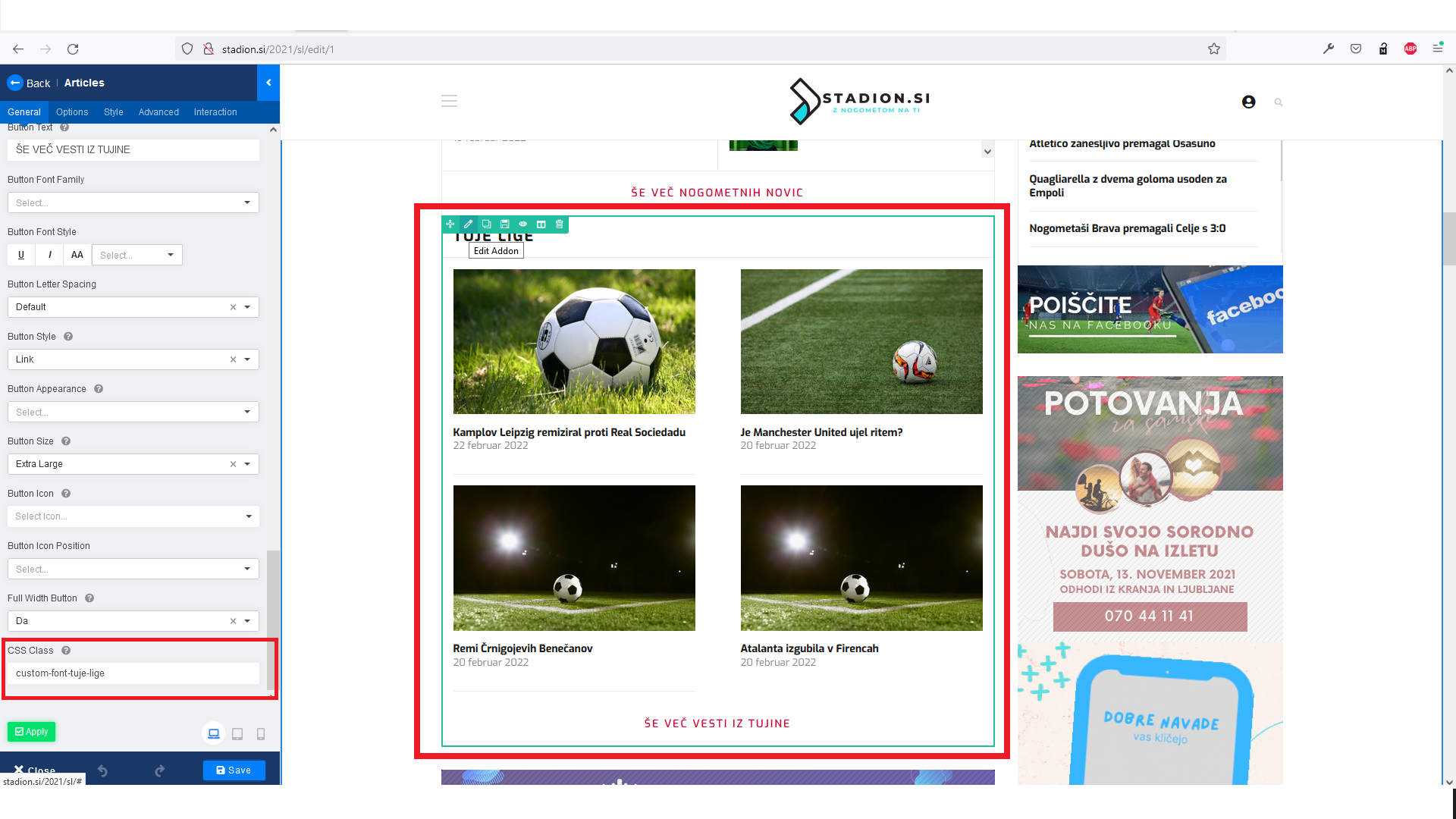
For the center section (Tuje Lige) - I have added a csutom css class from the SP Page Builder front end, then added the follwoing css in custom css section:
.custom-font-tuje-lige .sppb-addon-article-title {
   font-size: 15px !important;
}
5 more replies
Ariba Staff
4 years ago
· edited
Hello
Thank you for sharing the screensoht. Please mark the strings/words - you are unable to increase the font size.
Igor04 Asked this
Sorry. Hello, how do I increase the fonts highlighted in a photo? I was able to increase everything else.
Igor04 Asked this
Look pictures:
Igor04 Asked this
Thank you. Perfect.
Ariba Staff
You are most welcome :)
Log in to reply.