

Orphaned Labels & Missing Form Label
J
J
Hi,
We need a "AA" Web Accessibility rating and we are using "WAVE Web Accessibility Evaluation Tool" for inspection.
We are getting a conflict with the label in the incorrect position on this SPPB mailform (see link hidden content) is this something that can be resolved?
Is the label requirded to be associated with an "id" and not the "name"
How to Fix It If a text label for a form control is visible, use the <label> element to associate it with its respective form control. If there is no visible label, either provide an associated label, add a descriptive title attribute to the form control, or reference the label(s) using aria-labelledby. Labels are not required for image, submit, reset, button, or hidden form controls.
8 Answers
Order by
Oldest

Paul Frankowski
Accepted Answer@J
Guide on how to override addon, tip #7: https://www.joomshaper.com/documentation/sp-page-builder/sp-page-builder-3/how-to-tips
We talk about folder: components\com_sppagebuilder\addons\form_builder and file site.php
but where to add it, to be honest I am not sure ??? But I asked our Dev team to improve it in next update.
Paul Frankowski
Accepted AnswerHi J,
If we talk about "optin_form" (newsletter) addon it's possible only with addon code override (site.php).
But as I saw that you already used "Mailchimp Signup Form" HTML code that gives you more flexibility and it renders faster than SPPB module itself.
Paul Frankowski
Accepted AnswerBut if we talk about Contact Form addon -- give me few minutes, I will play on my own site. Maybe indeed some code needs to be improvment.
CSI Investigation started ....
Paul Frankowski
Accepted AnswerHere is screenshot from my demo site, and Wave tester show form on the "green" OK. But I used Form Builder addon (!) which has better code. I remember becuase we spent some time on it with developer.
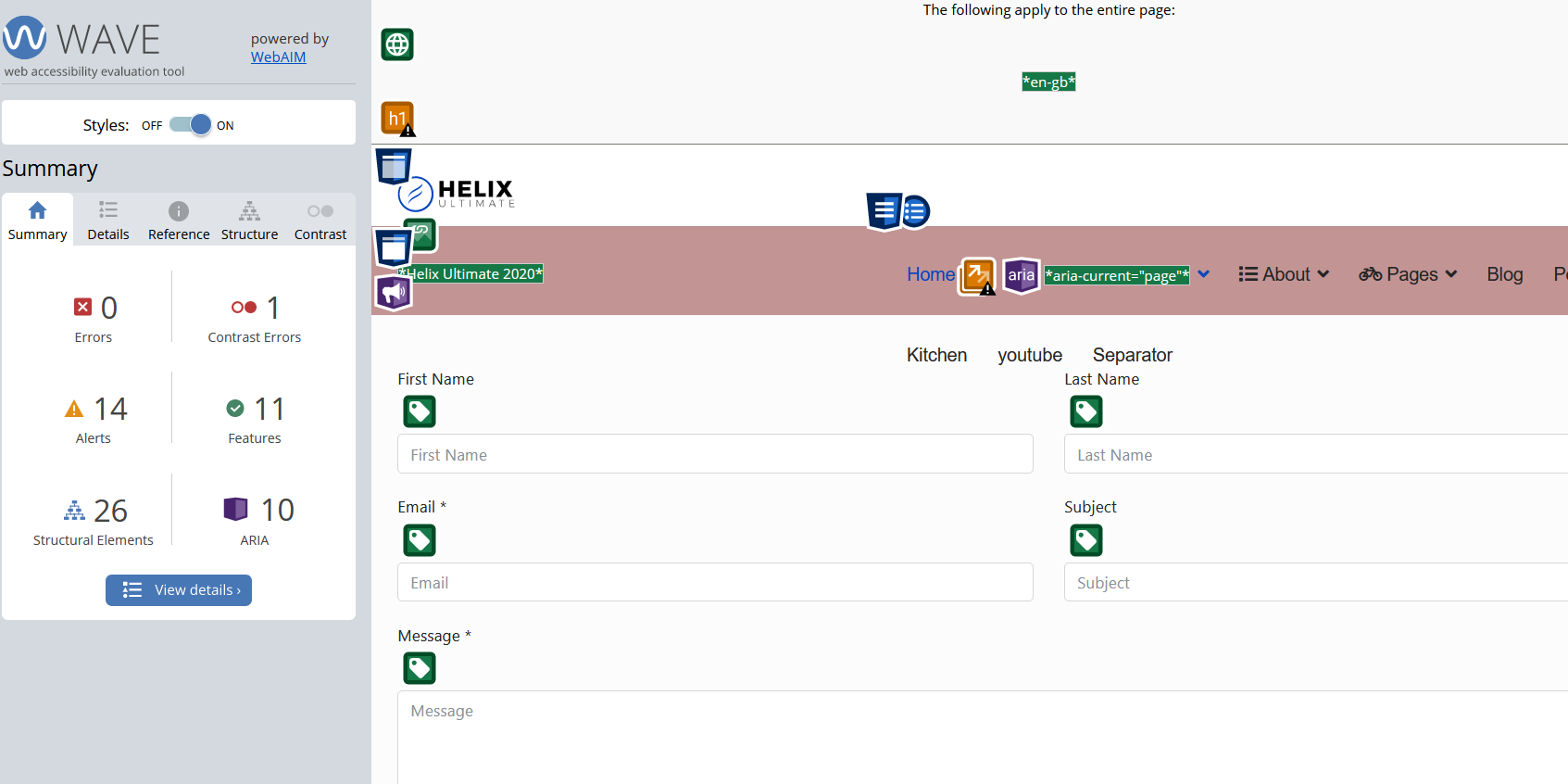
Paul Frankowski
Accepted AnswerMaybe easier for you will be just rebuild whole form (ready below), than edit contact addon php code. You know, I cannot customize php code here. And it may take "days" to wait for offcial addon update.
In case of...
Download, unzip, create a new page, import page, save addon and reuse and then customize it. Happy using.
J
J
Accepted AnswerHi Paul,
Thanks that worked for the most part, I see when the Captcha is on I get 1 error? Would I need to adjust the php file to add the <Label>
Thanks you are appreciated!
Jason
J
J
Accepted AnswerHi Paul,
Set this up but it does not seem to be firing? No success message and I added recipient email and sender email. See test page in hidden comments
J
J
Accepted AnswerSo there was something funny going on with the one you sent , so I recreated with the form builder in side of SPPB. And it sends email ok now and passes AA with 1 error do to the Captcha. Can you advise how to fix that. in the PHP file I guess I would add a <Label> ?
Please let me know which PHP file I should locate also