

Menu Alignment
JH
Jeff Honeyager
I have a mega menu displayed but...
On some pages (don't know what is different), the main menu is aligned left. On the home page it is aligned right.
How / Where do I change the CSS to make sure the main menu is always aligned right.
Go to the site: https://mariospoolsanddecks.com/
You are at the "home" location and the menu is aligned right and the mega menu under "Resources" looks good.
Go to: https://mariospoolsanddecks.com/our-services/pool-sales-installations
The menu is NOT aligned left and the mega menu under "Resources" is not correct.
Thanks for your help.
3 Answers
Order by
Oldest

Paul Frankowski
Accepted AnswerHi Jeff,
on 2nd link styles are loaded (and overriden) from RSForms. Please edit that form and in "Form properties" tab choose Bootstrap 5 framework.
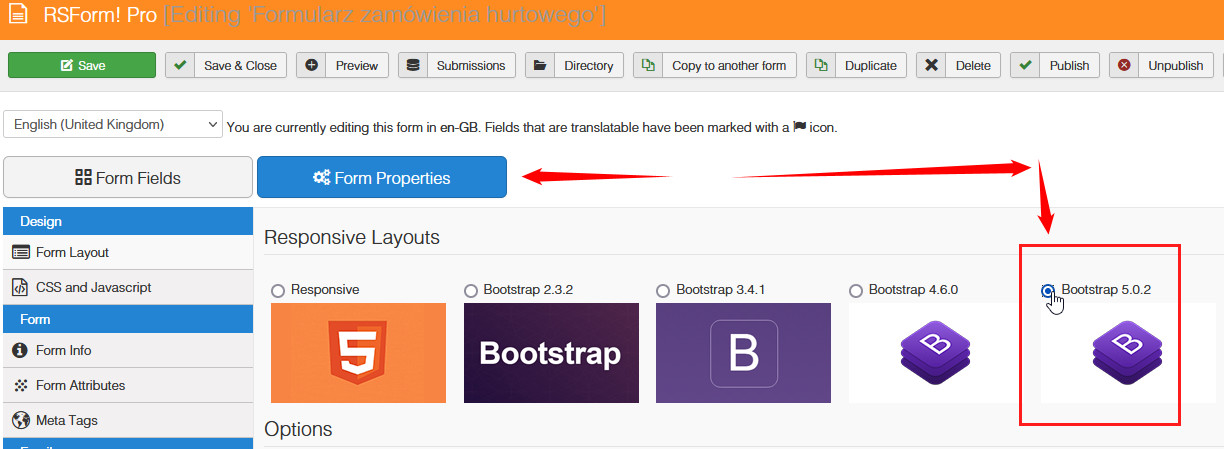
In case of ... you can always use custom CSS to force correct style
#sp-menu { flex: auto !important; }
JH
Jeff Honeyager
Accepted AnswerWow - I never would have guessed!
Thanks so much.
NOTE: I tried other layouts and the mega menu on pages with the form did not display correctly until I chose "Responsive" in the RS form layout.
Thanks again!
Go ahead and close this ticket.
Peace & Joy