

User Can Not Navigate With Arrow Keys In The Page
RB
Rafael Barba
The users can not navigate up/down with the keybord. What do I enabe it? I am using sharper-qubic frame
Regards
Website
http://anpact.com.mx
16 Answers
Order by
Oldest

Paul Frankowski
Accepted AnswerIf I may...
Firefox / Windows - tested and I could scroll down/up using keyboard arrows.
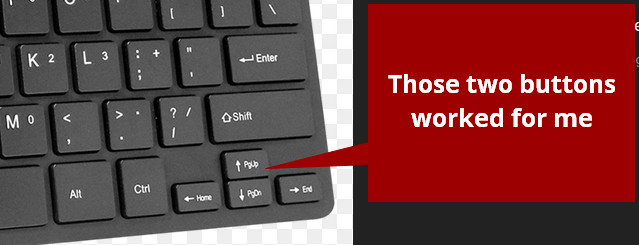
But my keyboard do not have "Home/End" nor "PageUp/PageDown" buttons to test it out. So there is a possibility that it may not by supported by navigation jQuery.

Toufiq
Accepted AnswerHi there,
Thanks for contacting us. Sorry for the inconvenience. Will you please provide me the Joomla administrator access to check the issue? I will check & get back to you soon.
-Thanks
RB
Rafael Barba
Accepted AnswerMine does not work, I tryed in 5 diferents computers, 2 MacAir, 2 Dell W10 and one Dell W11
Toufiq
Accepted AnswerWill you please provide me the Joomla administrator access to check the issue?
Toufiq
Accepted Answer@Rafael Barba Will you please provide me the Joomla administrator access to check the issue?

Jens W.
Accepted Answerㅤ@Rafael Barba If you remove the smoothscroll.js from the template "index.php" and instead place the following css in the custom css, then the keyboard navigation and smoothscrolling is working as intended.
change the following line in the index.php:
->addJS('bootstrap.min.js, jquery.sticky.js, smoothscroll.js, main.js, jquery.nav.js') //to
->addJS('bootstrap.min.js, jquery.sticky.js, main.js, jquery.nav.js') //and then add the following css to your custom css
html {
  scroll-behavior: smooth;
}
Please check the mails from yesterday "A New Comment Posted" there you will find the instructions as copy with images and what to do in detail.
RB
Rafael Barba
Accepted AnswerReady you are superadministrator. I did not remove nothing. I do not know why smoothscroll.js is missing
REgrads
Jens W.
Accepted Answer@Toufiq Thank you for fixing his problem.
Please tell him, what you have changed, so he can do this for his other site too, where the same problem is present.
-> https://www.anpact.com.mx/
This would also help other customers who come across this problem.
Toufiq
Accepted AnswerDownload the file and replace this file on this file location
templates/your_template/js/smoothscroll.js
Toufiq
Accepted AnswerYou are most welcome. Will you please spend some to write a review about our product and support quality?