

Page Builder: How To Stop Inserting Demo Content ? - Question | JoomShaper
Black Friday sale is live with flat 50% OFF. Sale ends soon! Grab your deal now!

Page Builder: How To Stop Inserting Demo Content ?

HT

Hayden Thring

SP Page Builder 3 years ago

0
2 Answers
Paul Frankowski
Paul Frankowski
Accepted Answer
Senior Staff 3 years ago #71462

Hi Hayden,

the only way is .... to override Text addon inside your template and in that version of admin.php file remove "demo" text. This whole proces should take you not more than 2 minutes.

Read tip #7 from: https://www.joomshaper.com/documentation/sp-page-builder/sp-page-builder-3/how-to-tips

then edit line 156
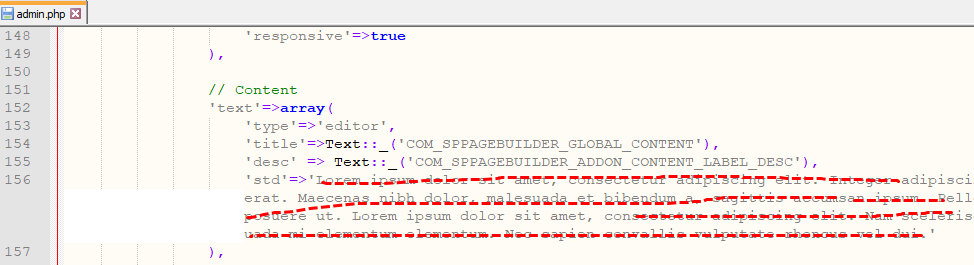
foto_8342_2022.jpg

This same you can do for other addon where "Lorem ipsum" content is unnecessary for you. Easy to find & correct.

1
Mehtaz Afsana Borsha
Accepted Answer
Support Agent 3 years ago #71457

Hi,

Thanks for contacting us. Could you please check your post? There is nothing on that.

-Regards.

-1
