

Full Width Article Image
G
Graeme
I have produced several site full with article headers using SPPagebuilder and a helix Ultima template within a joomla article
I know there is a full width option in settings but when you want to mix full width and normal fixed width blogs this is not an option so i use this
`/***SPPB Full Width Section for articles and sppb modules*/ .phm-mod-article-full-width-section .sppb-row-container, .phm-mod-article-full-width-section .sppb-container-inner { margin: auto; } @media (min-width: 1140px) { .phm-mod-article-full-width-section { margin: 0 -21vw !important; width: inherit !important; } .phm-mod-article-full-width-section .sppb-row-container, .phm-mod-article-full-width-section .sppb-container-inner { max-width: 1140px; } } @media (max-width: 1140px) { .phm-mod-article-full-width-section { margin: 0 -10vw !important; width: inherit !important; } .phm-mod-article-full-width-section .sppb-row-container, .phm-mod-article-full-width-section .sppb-container-inner { max-width: 992px; } } @media (max-width: 991px) { .phm-mod-article-full-width-section { margin: 0 -16vw !important; width: inherit !important; } .phm-mod-article-full-width-section .sppb-row-container, .phm-mod-article-full-width-section .sppb-container-inner { max-width: 768px; } } @media (max-width: 767px) { .phm-mod-article-full-width-section { margin: 0 -17vw !important; width: inherit !important; } .phm-mod-article-full-width-section .sppb-row-container, .phm-mod-article-full-width-section .sppb-container-inner { max-width: 576px; } } @media (max-width: 575px) { .phm-mod-article-full-width-section { margin: 0 -5vw !important; padding-left: 20px !important; padding-right: 20px !important; width: inherit !important; } .phm-mod-article-full-width-section .sppb-row-container, .phm-mod-article-full-width-section .sppb-container-inner { max-width: 100%; } } /*****End**/
/***SPPB Full Width Section for articles and sppb modules behind the menu*/
.view-article #sp-main-body, .view-article #sp-header.header-sticky~section#sp-main-body { padding-top: 0; }
.article-details .article-can-edit { margin-bottom: 0; } /*****End**/`
But I have trided both this and the settings full with option and i cannot get rid of the space at the top of the page or get rid of the article-details .article-ratings-social-share this has been very simple to do in previous sites but i am at a bit of a loss on this site as to why i cannot do this is there some thing different in the joomla 4 template code?
Website
https://skm2.dns-systems.net
3 Answers
Order by
Oldest

Paul Frankowski
Accepted AnswerHi Graeme.
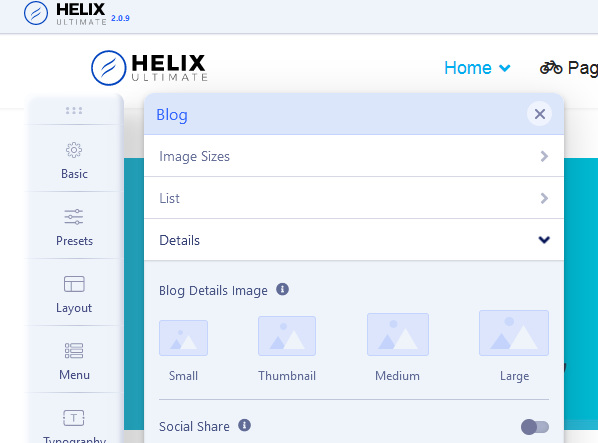
About "Social Share" you can disable it in Template Options > Blog > Details > Social Share : OFF
Paul Frankowski
Accepted AnswerAbout top padding (space) - please use below custom CSS
.article-details .article-ratings-social-share {
  padding: 5px 0;
  border-top: 0; border-bottom: 0; margin-bottom: 0;}
How to use Custom CSS you can read in Helix documenation (manual)