

Problems After Upgrade To SP PB Pro 4.0.3
TH
Thomas Harsch
Hi, I upgraded a staging copy of my site from SPPB 3.8.8 Pro to 4.0.3 Pro.
So far I saw following issues:
Home: The rounded edges from the text boxes are gone. The shadow of the news scroller ist distorted, there is a white spot beneath the scroller before the shadow begins. When logged in as Administrator/Moderator no button "Edit with Pagebuilder" is shown anymore. When I swap to an article and come back to the home page the news scroller shows "No item found". The textblocks and the animated heading does not snap back to the original position when leaving with the mouse (they have mouse over effects configured.
Articles: i.e. "Makerspace -> Rack-Einschub USW-Flex-Mini" The button of the Image Layout is shown "very weak" and in the wrong position. i.e. "Internet Security -> Eigene CA mit XCA -> Das eigene Root-Zertifikat ausrollen" The textblock with the yellow background does not snap back to its original position when I leave with the mouse (it has a mouseover effect configured) i.e. "Internet Security -> Mailverschlüsselung mit S/MIME" The link button in the section "Beschaffung des Zertifikats" in the first image layout in this section isn't shown as Button, instead it is shown as plain link. All articles: When logged in as Administrator/Moderator no button "Edit with Pagebuilder" is shown anymore.
That is all that I have seen so far, but I have not tried any editor functions, yet.
The original site for comparison how it should look like: https://picsnmore.de
I used Microsoft Edge 104.0.1293.54 on macOS 12.5
Server is a Linux Debian 11, NGINX 1.18.0, PHP 8.0.21, MariaDB 10.3.31, Joomla 4.1.5, Helix Ultimate 2.0.10 Caches has been cleaned with no effect.
9 Answers
Order by
Oldest

Toufiq
Accepted AnswerHi there,
Thanks for contacting us. Sorry for the inconvenience. Can you share a screenshot of your problem areas?
-Thanks
TH
Thomas Harsch
Accepted AnswerHere you are:
On the Left the correct website is shown on the right the problems:
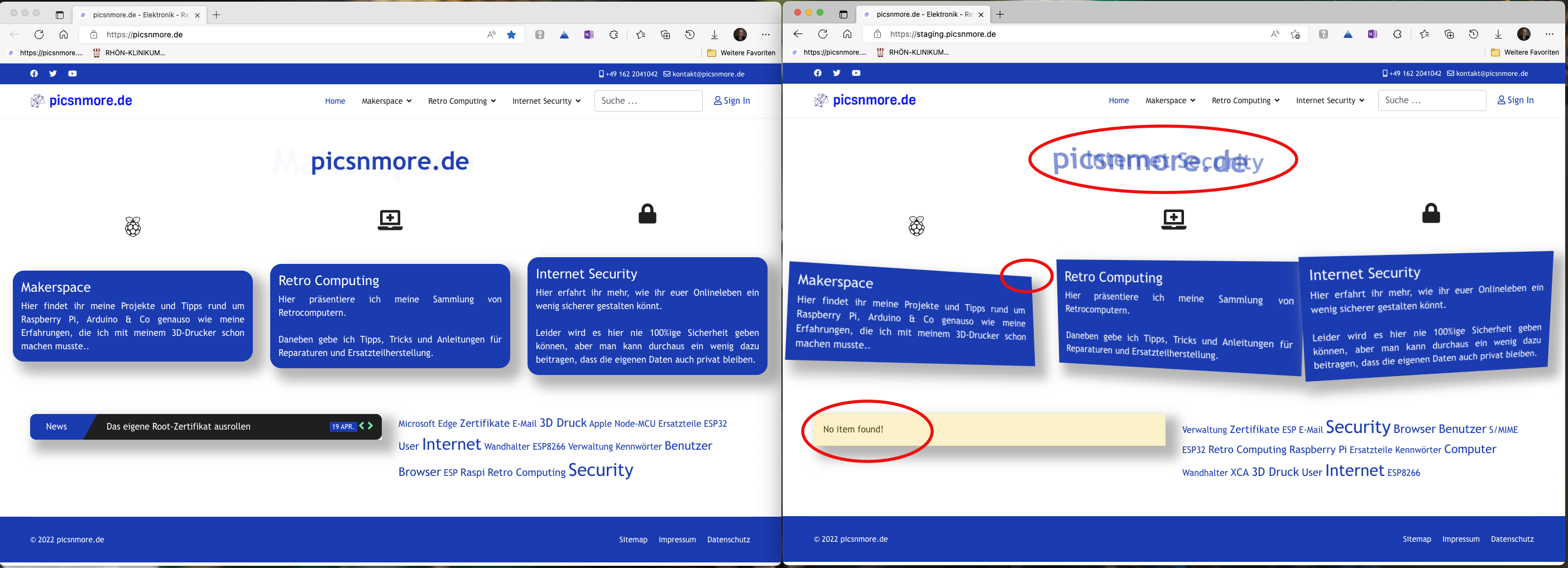 Please note that the textblocks did not snap back after leaving them with the mouse.
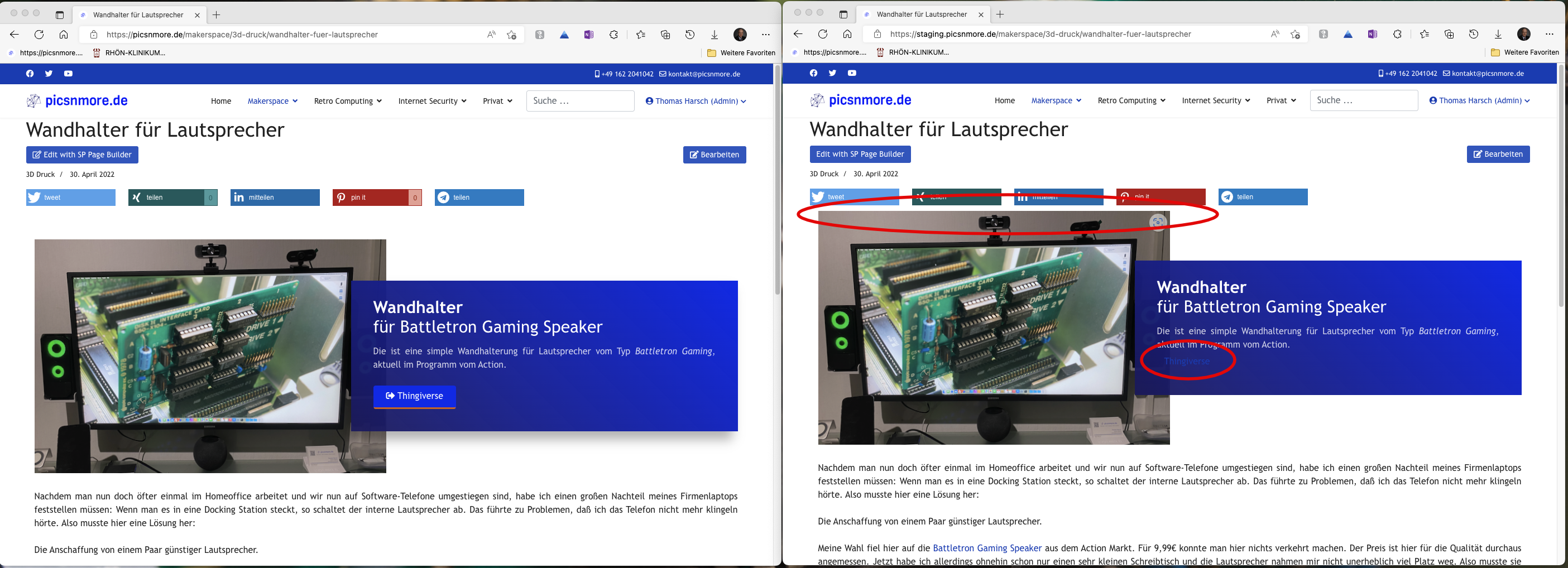 I noticed that the "Edit with SP Page Builder" is back for some reason now, I cannnot tell. But as I had the site sidebyside I noticed, that tha spacing between the Image Layout an the top (I use shariff as social media plugin for displaying the SM-Links above the article) do not match. Also the button is wrong.
 Here is the same problem with the mouse over effect as on the home page... but it's interresting that the edges of the textblock are rounded correctly (as on the homepage this is not).
 The button is shown as plain link.
TH
Thomas Harsch
Accepted AnswerHi, I rechecked this issues.
The rounded edges on the homepage are OK now, the newsscroller shows content but is way to wide now so that it runs into the Tag-Cloud. The problem with the mouse over effect did not change.
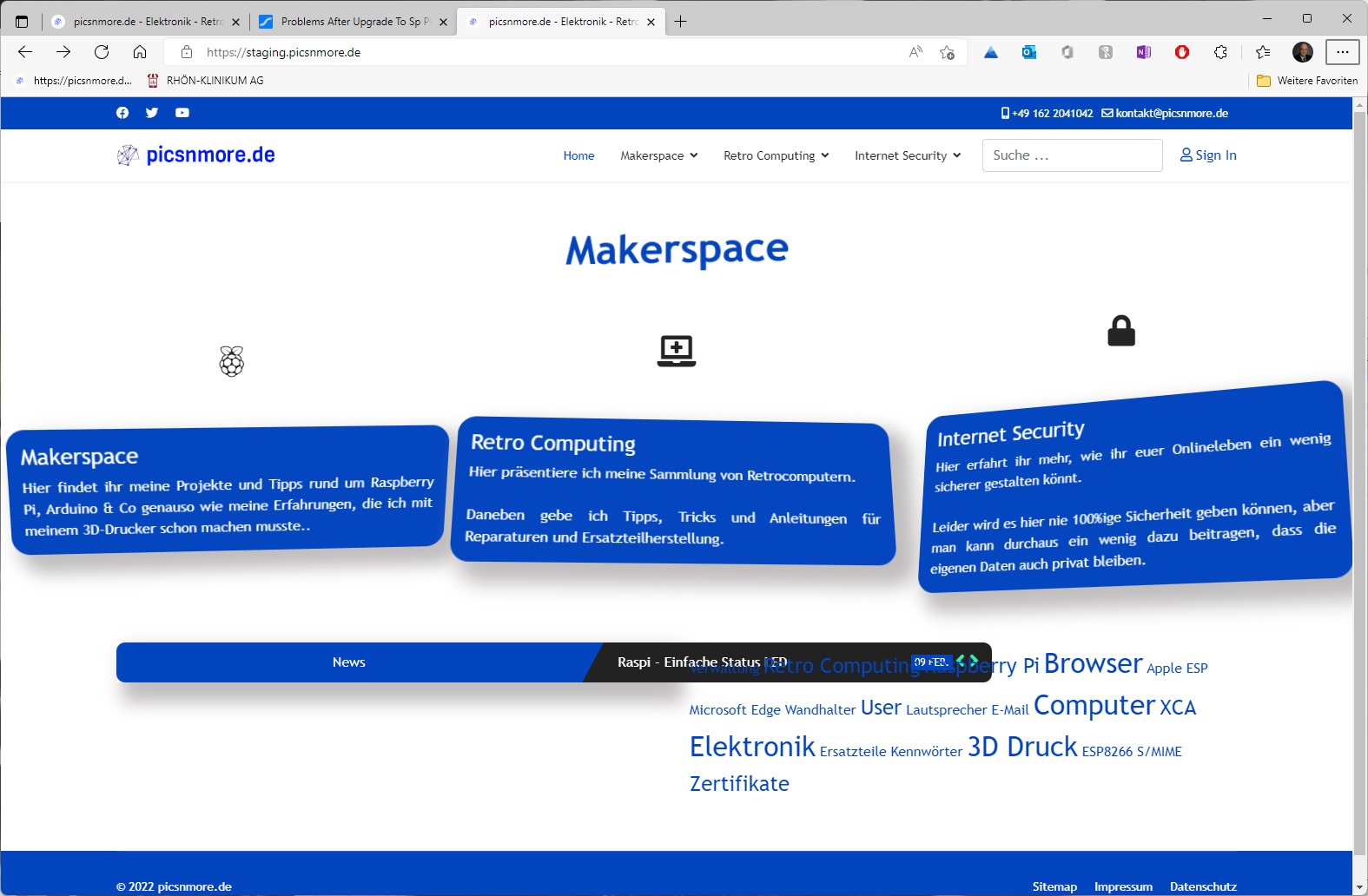
The problems on the other pages have not changed at all.
Toufiq
Accepted AnswerI just re-touch the settings. Will you please try yourself and let me know. Thanks
TH
Thomas Harsch
Accepted AnswerUnfortunally this does not help at all.
For the home page I switched of the "Interaction" -> "Tilt Effect" for the compoments, saved the page, set the tilt effect again, saved the page. Result: same behaviour as before.
I also tried to figure out, where I can set the width of the newsscroller box, I didn't find a setting.
I also saw another problem: when I modify the page, save it and close the edit-mode, the "ns918_sppagebuilder" is not checked in, I have to release it manually at the admin interface.
TH
Thomas Harsch
Accepted AnswerThat did not change the behaviour at all.
In editing mode the tilt effect snaps back as expected, when leaving the editor the behaviour is as shown on the screenshot. Also I do not find width-settings for the articles scroller
Only thing changed: The table is checked in after leaving the editor mode.